

Claude Update October 2026: 7 Changes for Business Owners
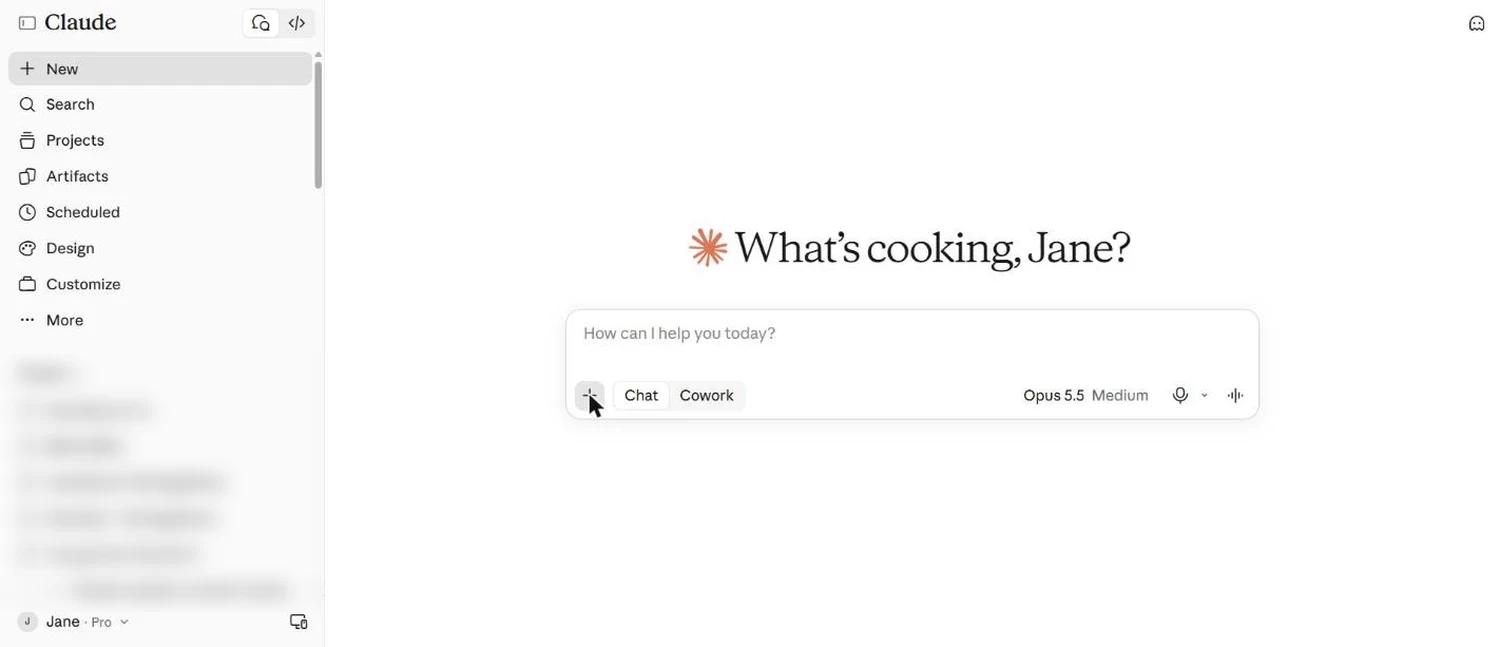
In short: between September and October 2026, Claude changed more than in the previous six months.
Chat and Cowork are becoming one assistant. Opus 5.5 is the new default model. Projects and scheduled work are moving to the cloud. Design, Docs and Slides now sit inside the main app.
If your team learned Claude earlier this year, some of what they know is already out of date.
Quick answer: what changed in Claude?
The October 2026 Claude update merges Chat and Cowork into one Claude (rolling out from 16 September), makes Opus 5.5 the default model on paid plans with Medium effort recommended, lets Projects and routines keep working in the cloud after you close your laptop, moves Claude Design into the main app (the standalone site closes on 14 December), and changes how Skills should be written. Several settings, including Memory, have also moved.
Every few weeks a client asks me the same question: “Jane, the screen looks different again. Did I break something?”
You didn’t. Claude is changing quickly, and most of these changes affect how much work you can hand over, what it costs you in usage, and how your team should be trained. Here is what changed and what it means for a business, in plain English.
The 7 changes at a glance
| What changed | What it means for your business | Who should care |
|---|---|---|
| Chat and Cowork merged | One place to ask questions and hand over work | Every Claude user |
| Opus 5.5 is the default | Better first drafts with fewer retries | Pro and Max users |
| Effort guidance | Usage limits last longer when you set effort well | Anyone who hits limits |
| Projects in the cloud | Work continues after you close the laptop | Owners delegating ongoing work |
| Scheduled tasks and routines | Reports and checks run on a timetable or trigger | Operations and marketing teams |
| Shorter Skills | Less to maintain, faster to build | Teams with saved Skills |
| Design, Docs, Slides inside Claude | One app for documents, decks and visuals | Marketing and sales teams |
1. Chat and Cowork are now one Claude
Until September, you had to decide upfront. Chat was for questions and drafts. Cowork was for real work on your files and folders.
On 16 September 2026, Anthropic started merging the two into one Claude, rolling out over several weeks. You type what you need, and Claude decides whether that needs a quick reply or a longer task that keeps running.
The rollout is gradual. Some accounts still show a Chat and Cowork switch under the chat box. Others don’t. If you train a team, expect people to see slightly different screens for a while.
Business implication: the question for your team moves from “which tool do I open?” to “what work am I handing over, and what does done look like?” That second question is a management skill, and it now decides how much value you get from Claude.
2. Opus 5.5 is the new default model
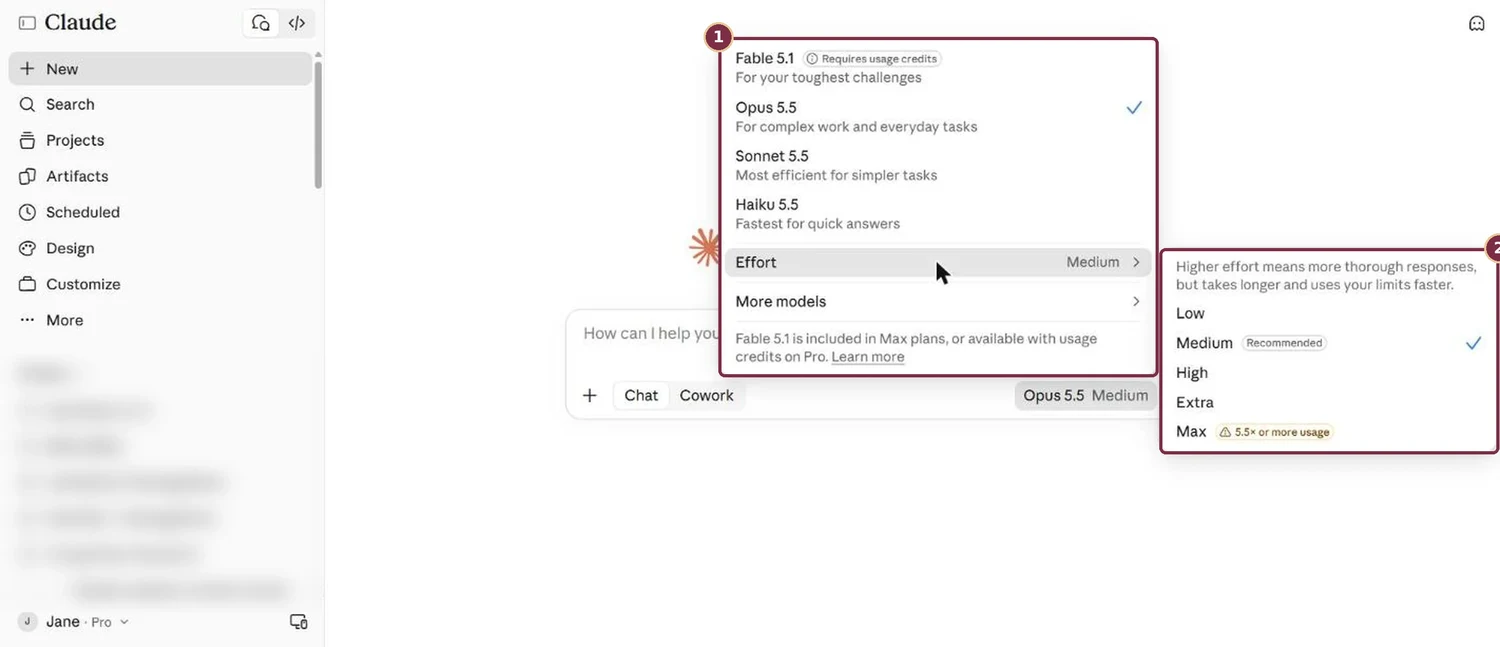
Open the model menu today and you’ll see four options:
- Fable 5.1: for the toughest challenges. Included in Max, and needs extra usage credits on Pro.
- Opus 5.5: “for complex work and everyday tasks”. This is now the default.
- Sonnet 5.5: “most efficient for simpler tasks”.
- Haiku 5.5: fastest, for quick answers.
Earlier in the year, many trainers (including me) told business users to start on Sonnet to save usage. That advice has changed. Anthropic’s own guidance now says most work should start on Opus 5.5.
The reason is simple. A cheaper model costs less per word. Per job, it can cost more. If it needs three attempts to get a proposal right, you have spent more usage and more of your time than one good attempt on Opus.
3. Effort matters more than switching models
Effort controls how long Claude thinks before it answers. The options are Low, Medium, High, Extra and Max. Claude now marks Medium as recommended and warns that Max can use 5.5 times or more of your usage.
Many users push effort to the top because higher sounds better. On newer models, Medium often matches what older models produced on High.
The second habit to change is switching models in the middle of a conversation. Each switch makes Claude read the whole conversation again from scratch, which uses more of your limit.
Pick your model at the start of a piece of work and stay on it. For a quick side question, lower the effort or simply ask for a short answer.
For business owners on a Pro plan, this is a cost decision. Good habits here are the difference between Claude lasting the whole working day and running out by lunch.
Not sure where your team stands with AI?
Take the free DigitalAI Readiness Assessment and see which gaps to close before you hand more work to Claude.
Take the free assessment4. Projects are becoming departments in the cloud
A Project used to be a folder of related chats with shared instructions and files. Useful, but each chat worked on its own.
In September, Projects in Claude Code changed. A Project now acts like a team lead. You brief it once, it starts several threads of work underneath, and those threads run in the cloud. They keep going after you close your laptop. This is still in beta and still limited to Claude Code, so most business users won’t see it in everyday chat yet.
The useful idea for every business owner is how to think about a Project: treat each one as a department with its own handbook. A Sales Project knows your offers, pricing rules and tone. A Finance Project knows your invoice format and approval limits. The better the handbook, the less you repeat yourself.
One caution: work in these cloud threads defaults to the strongest model on high effort. That burns through limits quickly. Check the Project settings before you leave anything running overnight.
5. Scheduled tasks and routines run while you’re away
Scheduled tasks let Claude run a job on a timetable: a Monday sales summary, a Friday review of open enquiries, a daily news brief on your industry.
Routines in Claude Code go a step further. A routine can start from an event, such as a new form submission or a message from another system, instead of only a time of day.
Two other changes make unattended work more practical:
- Cloud sessions run on Anthropic’s servers on your normal plan, so your own computer can be off.
- Usage limits no longer kill a task halfway. In Claude Code, when you hit the 5-hour limit, the task now waits and picks up again when the limit resets.
A practical example for a Malaysian training provider: every Monday at 8am, Claude reads last week’s enquiry export, lists the leads nobody has followed up, and drafts a reply for each. The team reviews and sends. That is a few hours a week returned to sales.
Start with one low-risk, repeating job. Read the output for the first few weeks before you trust it.
6. Skills are getting shorter
Earlier this year, the advice was to write Skills as full step-by-step manuals. Hundreds of lines on how to write, how to format, how to check.
Newer models already do much of that on their own. Anthropic now suggests a different order: run the job once without a skill, write down only what Claude got wrong, and put those corrections into the skill.
The result is a short skill that holds what Claude can’t know: your pricing rules, your approval steps, your customer’s language, the mistakes your team has learned to avoid. The desktop app can also record a skill by watching you do the job once.
Business implication: your competitive edge in a skill is your business knowledge. Generic writing rules add little. Your know-how is what makes the output yours.
7. Design, Docs and Slides move inside Claude
Claude Docs and Claude Slides launched in beta, and Claude Design now works inside your conversations. The sidebar has its own Design entry, and Artifacts lets you start a document, slide deck, design or dashboard from one place.
Brand teams can also save a design system (your colours, fonts and layout rules) so new pages, decks and visuals follow your brand from the first draft.
Date to note: the standalone Claude Design site is scheduled to close on 14 December 2026. If you built anything there, open Artifacts and migrate it before then.
What business owners should do this month
Every update brings a fresh round of “you must try this” posts. None of these changes fix an unclear process or a vague brief. Claude is more capable now, so the gap shows up faster in what you ask it to do.
Three steps for this month:
- Re-check your settings. Several settings moved in October, including Memory. Make sure privacy, memory and model choices still match how your business wants to work.
- Review your saved Skills. Test each one against a run without it. Keep what improves the result. Cut the rest.
- Pick one job to hand over. Choose something weekly, low-risk and well understood. Write down what done looks like before you hand it to Claude.
Strategy before tools. Clarity before automation. The businesses getting the most from Claude this quarter are the ones that know exactly what they want it to do.
Get the full hands-on Claude setup
Join the November Claude AI Masterclass. We set Claude up on the current screen, together, and you leave with real work handed over.
| LEVEL 1AI CoworkerFrom chatting with AI to handing it real work | 19 Nov (Thu) |
| LEVEL 2AI TeamMake good work repeatable with Skills and Plugins | 20 Nov (Fri) |
| LEVEL 3AI BuilderBuild your own simple business app with Claude Code | 26 Nov (Thu) |
| LEVEL 4AI ScalerRun your business on an AI operating system that grows without chaos | Coming soon |
HRDC-claimable corporate sessions available. Email janechew@digitalaibusinessclub.com
Frequently asked questions
Is Claude Cowork still available after the update?
Yes. Cowork has been folded into the main Claude app. From 16 September 2026, Anthropic began merging Chat and Cowork into one Claude, rolling out over several weeks. You type your request and Claude decides whether it needs a quick answer or a longer piece of work. Some accounts still show a Chat and Cowork switch while the rollout finishes.
Is Claude Cowork free?
Not yet. The merged experience reached Pro and Max plans first. Anthropic said Free and Team plans would follow, without a date. If your team needs Claude to work on files and folders today, plan for Pro at minimum.
Which Claude model should a business use in October 2026?
Start with Opus 5.5, which is now the default on paid plans and is labelled for complex work and everyday tasks. Keep effort on Medium, which Claude marks as recommended. Choose the model at the start of a piece of work and stay on it, because switching mid-chat makes Claude re-read the whole conversation.
What happens to Claude Design after 14 December 2026?
The standalone Claude Design site is scheduled to close on 14 December 2026. Design now lives inside the main Claude app. If you built designs on the standalone site, open Artifacts and use the migrate option before that date so your work moves across.
Do I need to rebuild my Claude Skills?
Review them first. Most only need trimming. Newer models already handle much of what long skills used to spell out. Run the job once without the skill, note what Claude gets wrong, and keep only those corrections and your business-specific rules in the skill.
Can Claude keep working after I close my laptop?
Yes, for some kinds of work. Scheduled tasks run on a timetable, and routines and cloud sessions in Claude Code run on Anthropic’s servers, so they continue after you close your laptop. These features are newer and some are still in beta, so start with one low-risk job and check the output.
Jane Chew / AI Strategy Coach, HRDC Corporate Trainer / Founder of digitalaibusinessclub.com.