
Basic AI Prompt Structuring and Formatting for Images
A practical guide to creating clearer, stronger, and more consistent AI images for social media, blogs, ads, emails, websites, and branded content.
The real shift: AI image prompting works better when you stop treating it like casual typing and start treating it like visual direction.
If you want to create AI images for your business, brand, website, newsletter, social media, ad creatives, or landing pages, the good news is this: you do not need to be a designer to get started.
But you do need one thing most people ignore.
Structure.
Many people open an AI image tool, type one sentence, and hope for the best. Sometimes that works. Sometimes you get something surprisingly good. But if you want repeatable quality, stronger control, and faster iteration, your prompt needs to be more intentional.
This is where prompt structuring and formatting matter.
In this guide, we will break down how to write AI image prompts more clearly, how word order affects outcomes, when to use styles and descriptors, and why formatting your prompts the right way can improve consistency.
Why basic prompts work — but only up to a point
Let us start with a simple example:
A large burger with a windy storm behind it
That is enough for an AI image model to create something usable. It has a clear subject. It has a background. It has a mood. In many cases, you will get a visually interesting result.
That is one of the great strengths of AI image generation: even simple prompts can produce images with texture, detail, and atmosphere.
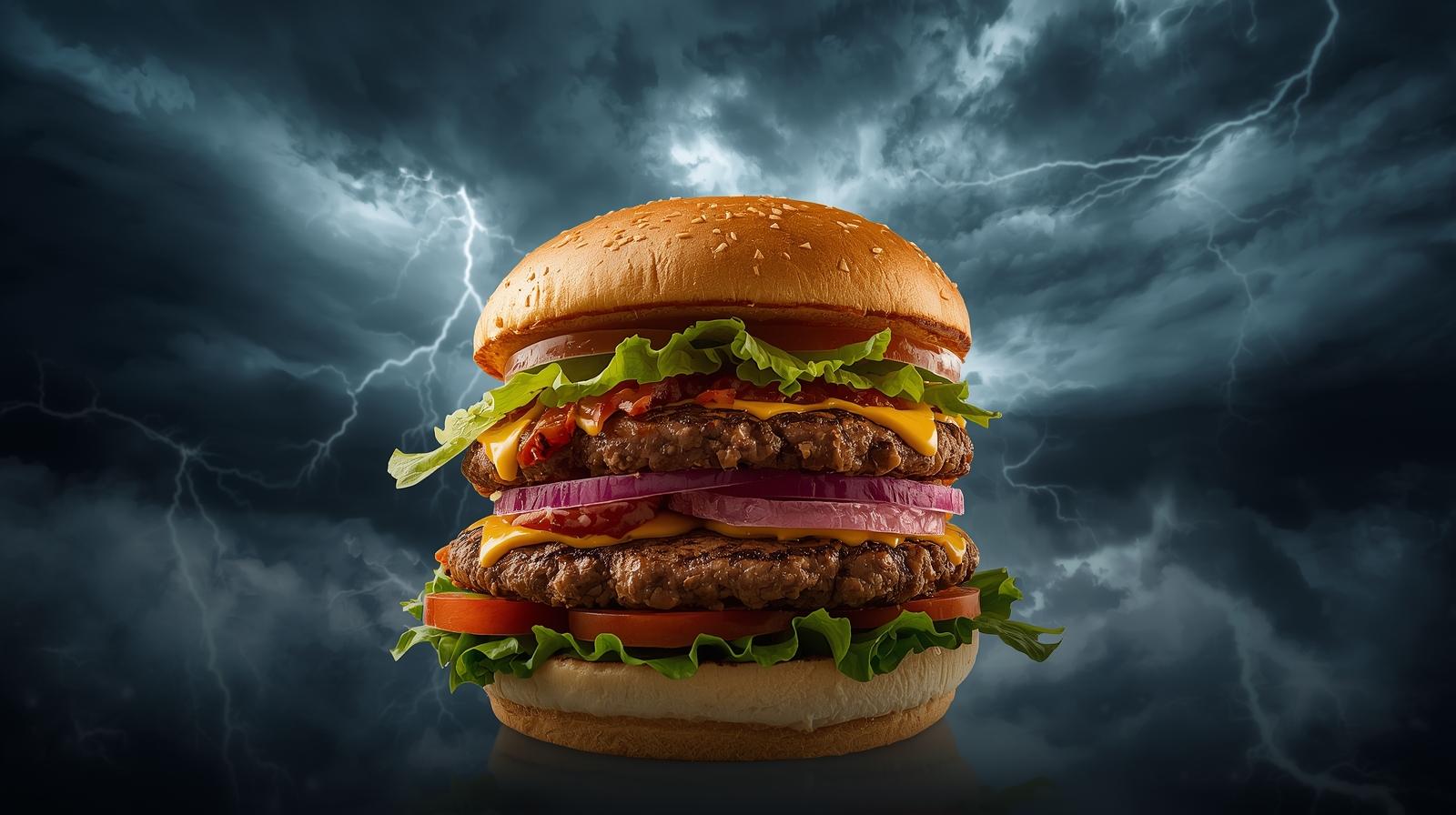
Now let us improve the same prompt:
A large burger with a windy storm behind it along with thunder clouds
That extra phrase may look small, but it matters. You are telling the model the storm should not merely be implied. It should be more visible and more pronounced. In other words, you are tightening the visual brief.
This is one of the easiest ways to improve AI images: keep the core subject the same, then strengthen the supporting details.
A practical prompt structure you can use
A useful beginner-friendly structure looks like this:
Format + Topic + Background / Details + Style + Descriptors + Parameters
You do not need every part every time. But this gives you a reliable starting framework.
| Element | What it does | Examples |
|---|---|---|
| Format | Tells the model what kind of visual output you want | photo, oil painting, digital illustration, CGI render |
| Topic | Defines the main subject | burger, dog, businesswoman, product box |
| Background / Details | Adds context, environment, mood, and scene information | storm, thunder clouds, city skyline, soft office setting |
| Style | Shapes the visual language of the image | fantasy art, editorial illustration, cinematic, surrealist |
| Descriptors | Refines quality, mood, lighting, realism, and texture | photorealistic, vivid colors, dramatic lighting, highly detailed |
| Parameters | Controls model-specific settings like ratio or stylization | square, widescreen, portrait, stylize level |
How style transforms the same idea
Once your subject and background are clear, the next major leap is style.
For example:
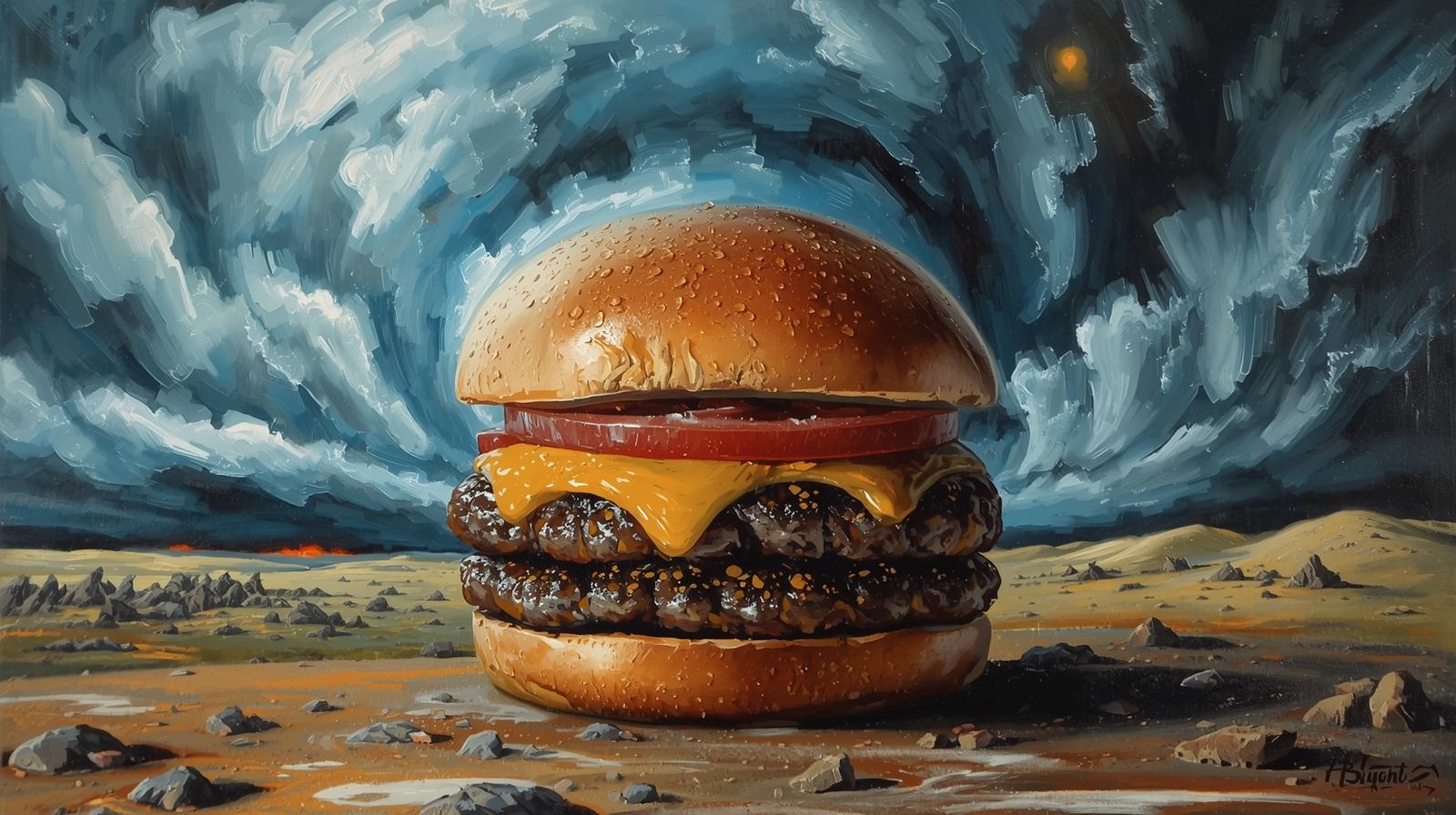
An oil painting of a burger with a windy storm behind it in the style of Vincent van Gogh
Now the image is no longer just about the burger and the storm. It becomes about brush strokes, movement, texture, emotional tone, and color expression. The style shifts the visual language.
You could also change the style direction again:
An oil painting of a burger with a windy storm behind it in the style of Salvador Dali
Now the image may feel more surreal, dreamlike, distorted, or symbolic. The subject has not changed much. The visual logic has.
That is why style references can be so powerful. They are not just decorative. They influence the entire visual interpretation.
The beginning of your prompt matters most
One of the most important lessons in AI prompting is this:
The earlier a word appears in your prompt, the more influence it often has on the final image.
If the subject is your priority, place the subject early.
If the style is your priority, move the style forward.
If the mood is critical, do not bury it at the end of a long sentence.
Think of the first part of your prompt as the emphasis zone. That is where you should place the instructions that matter most.
Keep the topic complete — but not overloaded
Another common mistake is trying to make the topic too specific and too complicated.
If you describe a subject with too many interacting details, the model may miss some of them or produce odd results. AI image generation is powerful, but it can still struggle with complex counting, precise hand positions, multiple objects with exact arrangements, or layered instructions all packed into one core subject.
Overloaded topic
A man with multiple arms and each arm is holding a cup of coffee with two spoons in each coffee
Cleaner topic
A surreal businessman holding multiple cups of coffee, dramatic concept art
The goal is not to remove meaning. The goal is to reduce confusion.
In practice, keep the subject short and recognisable, then add modifiers around it rather than loading everything into one long subject phrase.
What descriptors are really doing
Descriptors are the refiners. They do not usually define the main subject, but they strongly influence how the image feels.
Descriptors can shape:
- lighting
- detail level
- texture
- mood
- rendering style
- visual polish
Examples include:
Some advanced users include long lists of descriptors to let the AI choose across multiple visual cues. That can work for experimentation. But for consistency, it is usually better to stay intentional. Choose descriptors that support the image outcome you actually want.
Parameters: the technical part at the end
Parameters usually come last and depend on the image tool you are using. These may control the aspect ratio, canvas shape, stylization level, variation level, or how strictly the model follows the prompt.
In simple terms, parameters help answer questions like:
- Should this image be square or wide?
- Should it feel more realistic or more stylized?
- How much creative freedom should the AI have?
- Do I want a portrait, banner, thumbnail, or hero image format?
Even if you are not using advanced settings yet, it helps to understand that parameters are part of the structure. They are what turn a good prompt into a production-ready output for a specific use case.
Paragraph formatting vs keyword formatting
Formatting is another variable people overlook.
You can write prompts in paragraph format or keyword format, and the results may differ even when the content is almost the same.
| Format type | Example | Best use |
|---|---|---|
| Paragraph format | Oil painting of a dog howling at the full moon in the style of fantasy art. | Simple scenes, natural-language prompting, experimentation |
| Keyword format | oil painting, dog howling, full moon, fantasy art, dramatic sky, textured brushwork | Complex scenes, clearer control, reduced ambiguity |
Paragraph prompts are more conversational. They are often fine when the concept is simple.
Keyword prompts are more direct. They often work better when the image has many moving parts and you want the instructions to feel precise.
The key idea is not that one format is universally better. It is that formatting changes the emphasis and can affect how the AI interprets your prompt.
Why long walls of text do not guarantee better images
A long prompt can sometimes produce a great result. But long prompts often create inconsistency.
That is because AI image prompting is not the same as writing a novel or an encyclopedia entry. More words do not automatically mean more clarity.
In fact, too much language can dilute the most important instructions.
Better prompting is not about writing more. It is about choosing the right words, in the right order, with the right level of clarity.
Sometimes a long prompt gives you one lucky result. That can be useful for experimentation. But if you want consistency for content creation, brand visuals, or repeated campaigns, structured prompting is more reliable.
A simple workflow for business users
- Start simple. Write one clear sentence with the subject and background.
- Review the result. Ask: what is missing — mood, clarity, detail, style, or composition?
- Add one improvement at a time. Do not rewrite everything at once.
- Introduce style intentionally. Only add artistic direction after the subject is working.
- Use descriptors selectively. Add lighting, detail, or mood cues that support the outcome.
- Switch formatting if needed. If the model keeps missing parts, turn the prompt into keyword format.
- Adjust order for emphasis. Move the most important instruction toward the beginning.
Prompt templates you can reuse
1. Basic brand image
A [format] of [subject] with [background/details], [descriptor 1], [descriptor 2], in the style of [style reference or visual direction]
2. Social media post visual
Modern digital illustration of [topic], clean background, brand colors, bold composition, high contrast, social media marketing style
3. Website hero section image
Premium editorial-style illustration of [subject] in [setting], clean layout, minimal background, strategic business mood, professional lighting
4. Ad creative concept
Cinematic product image of [product], [emotion or mood], [background], advertising photography, dramatic lighting, highly detailed
Final takeaway
AI image generation may look magical from the outside, but the people who get better results are usually doing one thing differently:
They are not just describing an image.
They are structuring a visual instruction.
That means:
- starting with a clear subject
- adding supporting background details
- using style intentionally
- choosing descriptors that reinforce the result
- placing the most important instruction first
- using cleaner formatting when complexity increases
Once you understand this, prompting becomes less random and more strategic.
In short: prompting AI for images is not about writing more words. It is about programming direction with clarity.
— Jane Chew
Founder, DigitalAI Business Club