
Claude AI for Business: 3-Level Training Pathway
Choose One Level Individually — Or Build a Complete AI Capability Journey
A practical, business-first Claude AI training series for companies, SME owners, managers and employees who want to move from basic AI usage to real productivity, sales enablement, data insight, business apps and AI agents.
Most organisations are no longer asking whether AI is useful. The real question is: how do we train different teams to use AI at the right level?
A business owner or manager needs Claude for daily writing, content creation, and decision support. An operations, sales, or admin team needs Claude for sales proposals, documents, data reports, and Excel. A digital transformation lead needs to go further — building apps, automations and AI agents.
One Claude Programme. Three Commercially Separate Courses.
Claude AI for Business is designed as a 3-level training pathway. Each level is a complete 1-day course and may be sold individually, delivered separately, or combined into a structured AI transformation journey for teams.
This makes it easier for companies to train the right people at the right depth — from beginner users to advanced solution builders — with specialist trainers matched to each level.
Choose the Right Claude Course Level
Each level has a different business outcome. Participants do not need to attend all three courses unless the company wants to build a complete AI capability pathway.
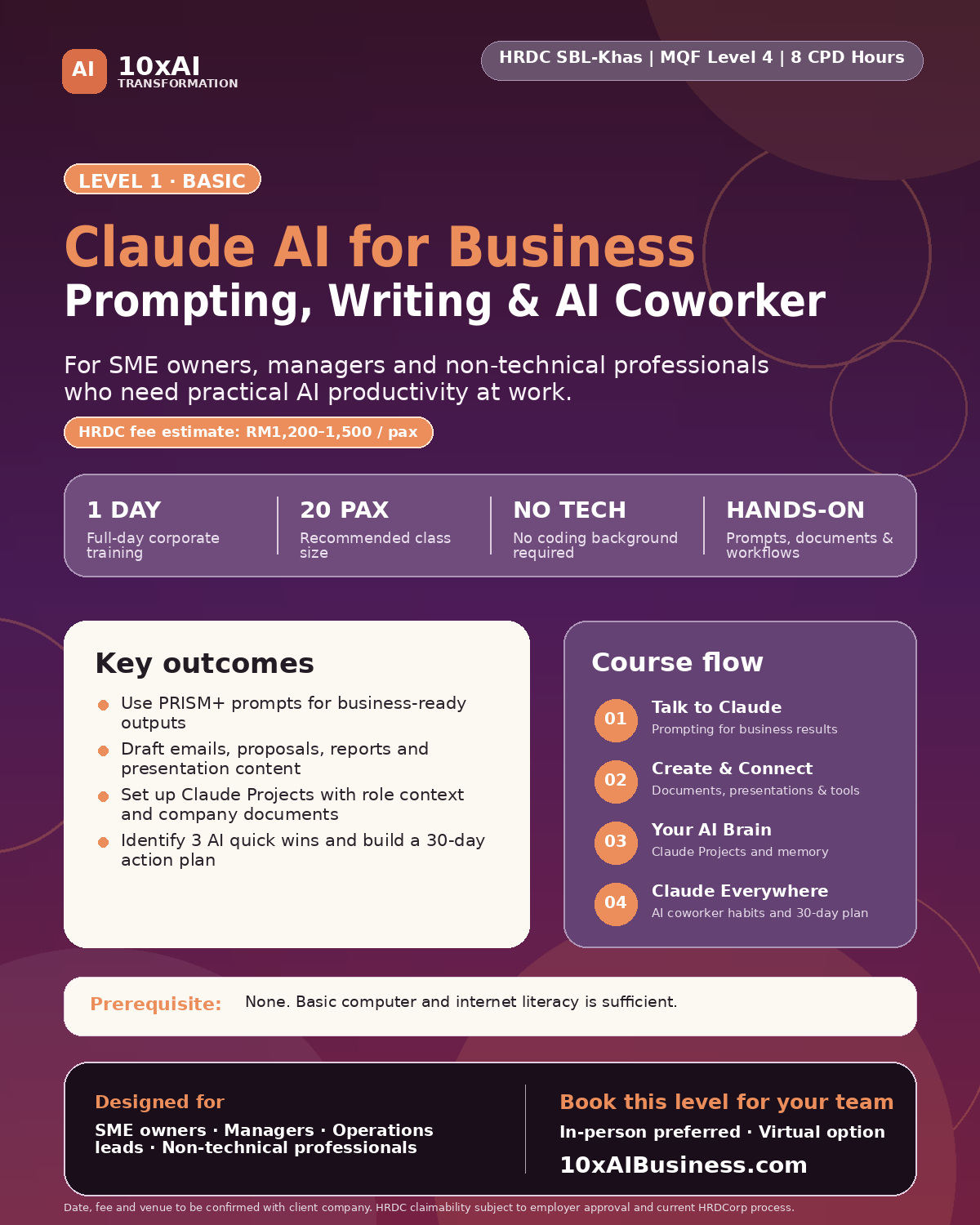
Prompting, Writing, Content & Your AI Coworker
Best for business owners, managers and non-technical professionals who want to use Claude confidently for daily work — including writing, content, and communication.
- Master PRISM+ prompting for business results
- Write emails, social posts, and documents faster
- Create basic content and one webpage with Claude
- Set up Claude Projects and AI coworker habits
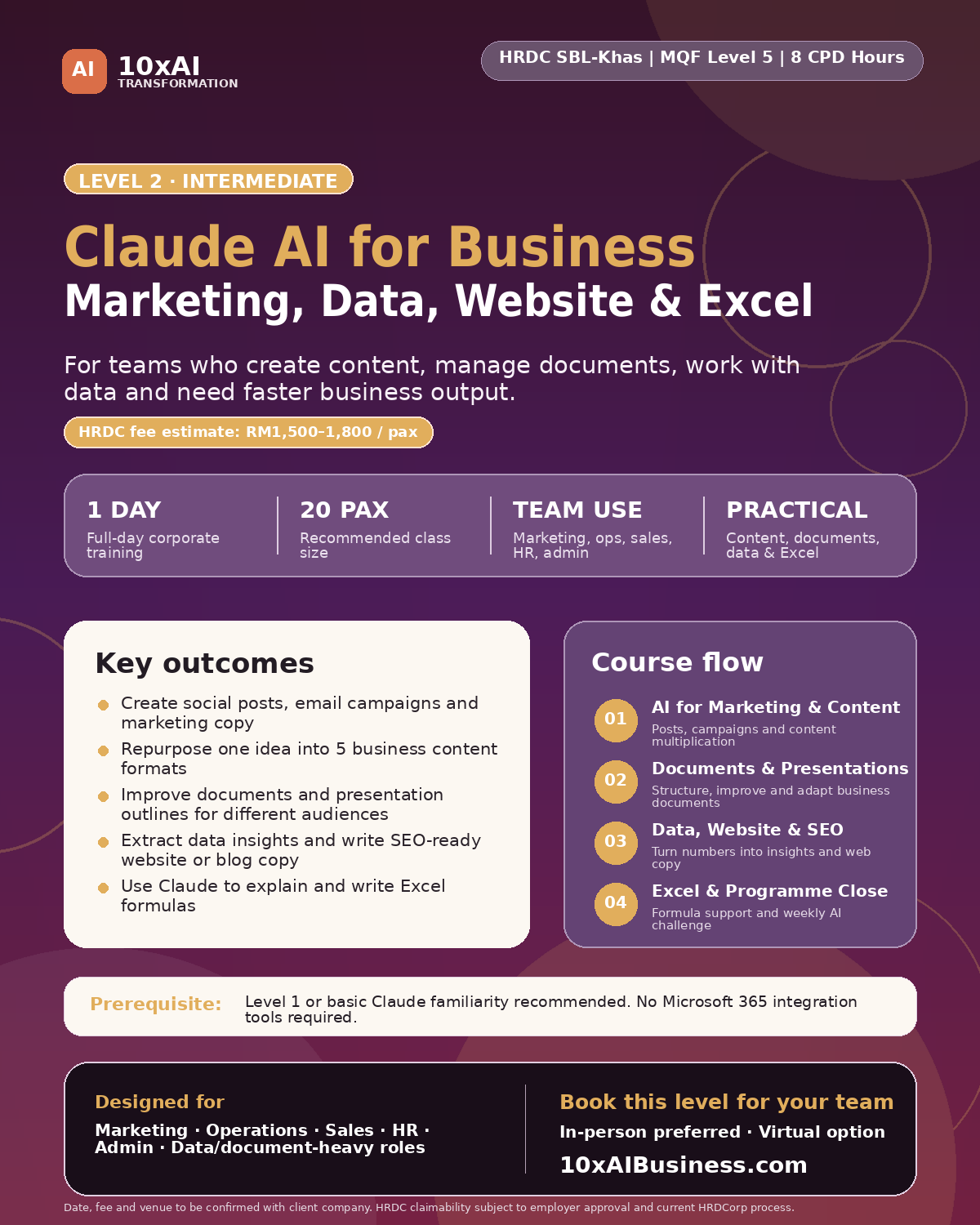
Sales Enablement, Documents, Data & Excel
Best for sales, operations, HR and admin teams who create proposals, manage documents, prepare reports, or work with spreadsheet data.
- Write proposals, pitch decks, and client documents
- Improve reports, presentations, and business documents
- Turn data into board-level management narratives
- Use Claude for Excel formulas and spreadsheet planning
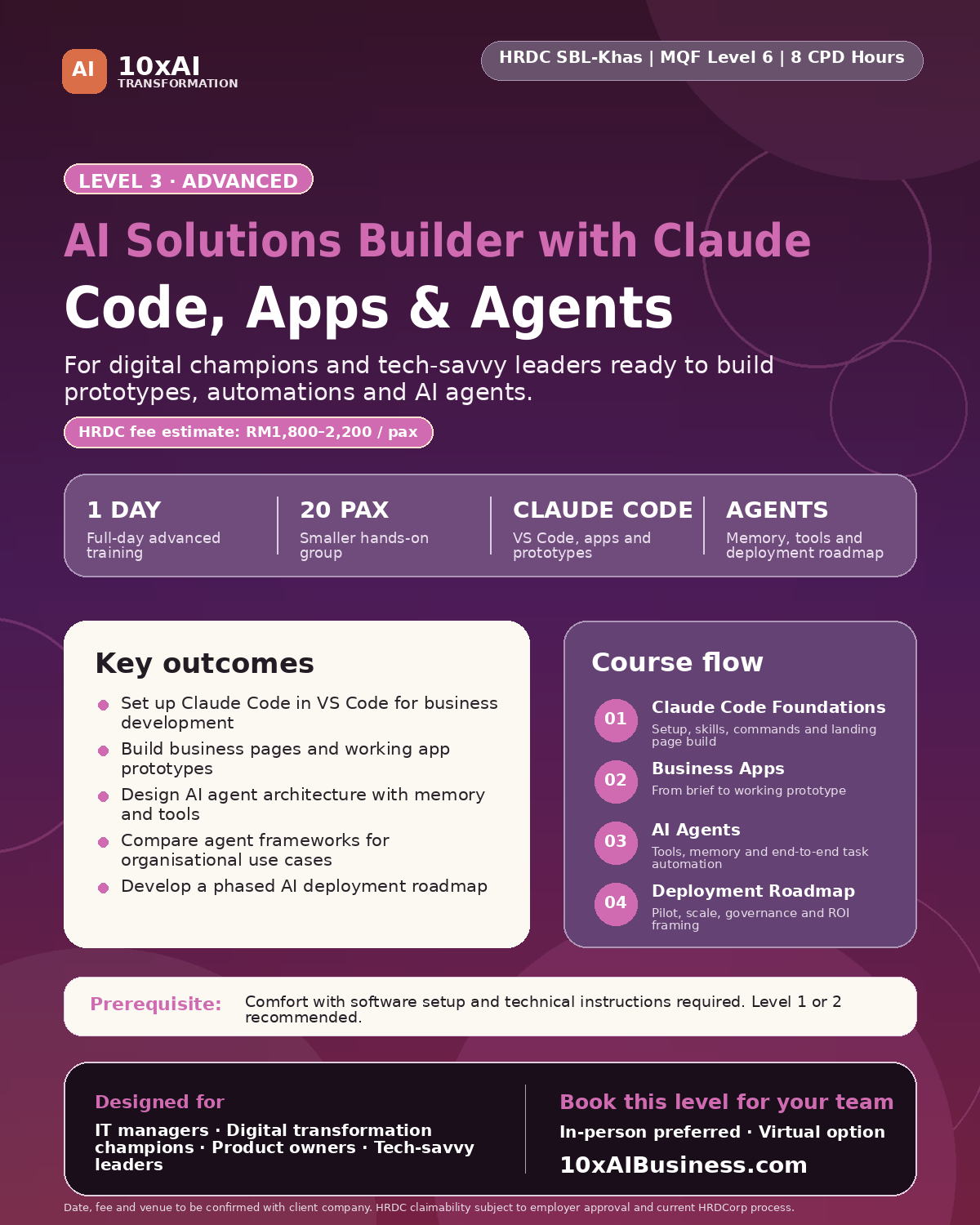
Code, Apps & Agents
Best for IT managers, digital champions, product owners and tech-savvy leaders who want to build AI solutions for their organisation.
- Set up Claude Code and VS Code
- Build a working business app prototype
- Design AI agents with memory, tools and task loops
- Create a 30/60/90-day AI deployment roadmap
Programme Comparison at a Glance
| Course Level | Programme Title | Trainer | Best For | Business Outcome | Duration |
|---|---|---|---|---|---|
| Level 1 Basic | Claude AI for Business: Prompting, Writing, Content & Your AI Coworker |
Jane Chew | SME owners, managers, non-technical professionals, executives and supervisors | Participants use Claude for daily productivity, writing, content creation, basic webpage copy and work planning. | 1 full day / 8 CPD hours |
| Level 2 Intermediate | Claude AI for Business: Sales Enablement, Documents, Data & Excel |
Ricky | Sales, operations, HR and admin teams who create proposals, manage documents, prepare reports or work with spreadsheet data | Participants produce proposals, client documents, presentation outlines, data summaries, management reports and Excel support outputs. | 1 full day / 8 CPD hours |
| Level 3 Advanced | AI Solutions Builder with Claude: Code, Apps & Agents |
TBC | IT managers, digital transformation leads, product owners, tech-savvy business leaders and internal AI champions | Participants build a working prototype, design AI agents and prepare a phased AI deployment roadmap. | 1 full day / 8 CPD hours |
Which Level Should Your Team Attend?
Start with Level 1
Choose Level 1 when your team is new to Claude or using AI inconsistently. This gives everyone a shared prompting framework, practical AI writing skills, and basic content creation confidence — with Jane Chew.
Move to Level 2
Choose Level 2 when your sales, ops, or admin team needs stronger outputs for proposals, client documents, data reports, and Excel — delivered by Ricky, who specialises in these business application areas.
Advance to Level 3
Choose Level 3 when your organisation wants internal AI builders who can prototype apps, explore automation, and design AI agents responsibly.
Claude AI for Business:
Prompting, Writing, Content & Your AI Coworker
This course helps participants move from casual AI usage to structured, business-ready Claude usage. Participants learn to prompt effectively, write and communicate faster, create basic content and social posts, and set up Claude as a personalised AI coworker — all without any technical background.
Who Should Attend
SME owners, business managers, operations leads, executives, supervisors and non-technical professionals who want to use Claude for daily productivity, writing, content creation, summarising, decision support, and business communication.
What Participants Will Learn
- How to apply the PRISM+ prompting framework for business-ready outputs
- How to write better prompts for emails, summaries, analysis, content and decision support
- How to write social media posts, basic email content, and brand voice copy using Claude
- How to repurpose one piece of content into multiple formats quickly
- How to use Claude to draft, edit and improve professional documents and presentations
- How to write one webpage — homepage, service page, or About Us — using customer-focused prompting
- How to set up Claude Projects with custom instructions, brand voice and uploaded company documents
- How to identify AI quick wins and build a personal 30-day AI implementation plan
Level 1 Course Flow
| # | Time | Session Title | Key Outputs |
|---|---|---|---|
| 1 | 9:00 – 10:30 AM | Talk to Claude Prompting for Business Results |
3 tested PRISM+ prompts · Personal prompt starter library |
| 2 | 11:00 AM – 12:30 PM | Create, Write & Connect Emails, Social Posts, Documents & One Webpage |
1 real email or document · 2 social posts · Brand voice prompt · 1 webpage draft |
| 3 | 1:30 – 3:00 PM | Your AI Brain Claude Projects & Brand Memory |
Configured Claude Project · Uploaded company document · Personalised system prompt |
| 4 | 3:30 – 5:00 PM | Claude Everywhere Your AI Coworker & 30-Day Plan |
5 AI quick wins identified · Completed 30-Day AI Adoption Plan · Week 1 commitment |
Claude AI for Business:
Sales Enablement, Documents, Data & Excel
This course turns Claude into a practical business output engine for sales, operations, and admin teams. Participants produce real deliverables across four high-value business functions: sales proposals and client documents, business reports and presentations, data summaries and management narratives, and Excel formula support.
Who Should Attend
Sales professionals, operations staff, HR teams, admin staff, and business support functions who create proposals, manage client documents, prepare management reports, or work with spreadsheet-based information regularly.
What Participants Will Learn
- How to write business proposals, quotations, pitch decks, and client presentations using Claude
- How to draft follow-up sequences, client briefing notes, and sales communication with Claude
- How to restructure business documents and build presentation outlines section by section
- How to adapt the same document for different audiences — internal, client-facing, and board-level
- How to turn raw data and business report text into written management summaries and KPI narratives
- How to use Claude to explain Excel formulas in plain English and write formulas from descriptions
- How to plan spreadsheet structures for trackers, reports, and dashboards using plain-language prompting
Level 2 Course Flow
| # | Time | Session Title | Key Outputs |
|---|---|---|---|
| 1 | 9:00 – 10:30 AM | AI for Sales Enablement Proposals, Pitches & Client Communications |
1 proposal or pitch deck outline · Client follow-up email sequence · Sales brief template |
| 2 | 11:00 AM – 12:30 PM | AI for Documents & Presentations Reports, Briefings & Slide Outlines |
1 business document draft · 6-slide presentation outline with speaker notes |
| 3 | 1:30 – 3:00 PM | AI for Data & Reporting Summaries, KPI Narratives & Management Reports |
1 data summary · Board-level management narrative · 3 reporting prompt templates |
| 4 | 3:30 – 5:00 PM | AI for Excel & Programme Close Formulas, Spreadsheet Planning & Week 1 Commitment |
3 Excel formulas generated or explained · Spreadsheet structure plan · Excel prompt card |
AI Solutions Builder with Claude:
Code, Apps & Agents
This advanced course helps participants move from using AI to building with AI. Designed for internal digital champions and tech-savvy business leaders who want to create prototypes, apps, automations and AI agents using Claude Code.
Who Should Attend
IT managers, digital transformation champions, product managers, technical business leaders and professionals who want to build AI tools, business apps, automations and AI agents for their organisation.
What Participants Will Learn
- How to set up Claude Code in VS Code for business application development
- How to use Claude Code operating modes, slash commands, skills and plugins
- How to build a functional business landing page or mini app from a written brief
- How to design basic AI agent architecture with memory, tools and task loops
- How to compare agent frameworks such as LangChain, CrewAI, AutoGen and Claude SDK
- How to produce a 30/60/90-day AI deployment roadmap with governance and risk considerations
Level 3 Course Flow
| # | Time | Session Title | Key Outputs |
|---|---|---|---|
| 1 | 9:00 – 10:30 AM | Claude Code Foundations Setup, Skills & Commands |
Initialised Claude Code project · 3 slash commands demonstrated · First build output |
| 2 | 11:00 AM – 12:30 PM | Building Business Apps with Claude Code Prototypes, Pages & Internal Tools |
Working prototype (landing page, form, or internal tool) built from participant’s own brief |
| 3 | 1:30 – 3:00 PM | Building AI Agents for Business Automation Architecture, Frameworks & Responsible Design |
AI agent architecture design · Framework comparison · Responsible deployment checklist |
| 4 | 3:30 – 5:00 PM | Deploying AI Solutions in Your Business Roadmap, Governance & Leadership Pitch |
30/60/90-day AI deployment roadmap · Governance checklist · Leadership pitch summary |
Delivery Format
| Programme Format | Each level is a standalone 1-day course. Companies may choose one level, selected levels, or all three levels as a complete AI capability pathway. |
| Delivery Mode | In-person preferred. Virtual or hybrid options may be arranged depending on course level and technical requirements. |
| Class Size | Up to 20 participants per cohort. Assistant facilitator recommended when participant count exceeds 10 pax (particularly for Level 3). |
| Language | English. Bahasa Malaysia support available for Levels 1 and 2. |
| Participant Requirement | Participants should bring their own laptop with internet access. For Level 3, VS Code and Claude Code must be installed before the training date — a pre-setup guide is provided. |
| HRDC Status | HRDC SBL-Khas claimable (each level submitted separately), subject to company eligibility, HRDC approval and final documentation. |
| Training Provider | 10xAI Business Consulting SB (submitted under engaging Training Provider) |
Why Companies Choose This 3-Level Claude Training Pathway
Different Teams, Different AI Depth
Not everyone needs to build AI agents. Some employees need productivity and writing skills. Others need proposals and data reports. Some need to build solutions. The 3-level structure makes AI training practical and role-specific — with matched specialist trainers at each level.
Every Session Produces Real Outputs
Participants do not only listen to theory. They produce emails, social posts, proposals, documents, data summaries, Excel formulas, or working prototypes — depending on the level — using Claude during the session itself.
Business Users First, Not Just Tech Teams
Levels 1 and 2 are designed entirely for non-technical business professionals. Level 3 is the only level requiring any technical comfort. This makes AI training accessible across the whole organisation, not just the IT department.
Supports Company-Wide AI Transformation
Companies can start with one level for a pilot cohort, then expand training across departments based on roles, readiness and business priorities — building a structured, documented AI capability pathway over time.
Frequently Asked Questions
Can each Claude course be sold individually?
Yes. Level 1, Level 2 and Level 3 are designed as commercially separate 1-day courses. Each can be sold, delivered and claimed separately under HRDC SBL-Khas, subject to company eligibility and HRDC approval.
What changed between the original Level 2 and the current Level 2?
Level 2 has been refocused around Ricky’s core expertise. The original marketing and content sessions have moved to Level 1 (where they fit Jane’s audience of SME owners and managers). Level 2 now covers Sales Enablement, Documents, Data and Excel — four areas where Ricky delivers at depth, and where sales and operations teams gain the most immediate business value.
Do participants need to attend Level 1 before Level 2?
Level 1 is recommended for anyone new to Claude. Level 2 can be attended independently by participants who already understand basic prompting and have some Claude familiarity. A 15-minute PRISM+ quick-start is included at the start of Level 2 for participants joining without Level 1.
Does Level 1 still cover content and marketing topics?
Yes. Level 1 now includes social media post writing, brand voice prompting, basic email content, and a webpage writing exercise — all within Session 2: Create, Write & Connect. This makes Level 1 a more complete daily productivity programme for SME owners and managers who handle their own content and communication.
Do participants need coding experience for Level 3?
No prior coding experience is required, but participants must be comfortable with installing software, following technical instructions and using a laptop for hands-on build activities. VS Code and Claude Code must be set up before the training day.
Which level is best for corporate staff?
Level 1 is best for general staff and managers who are new to Claude. Level 2 is best for sales, operations, HR, admin and business support teams. Level 3 is best for digital champions, IT managers and internal AI builders.
Is this course HRDC claimable?
The courses are structured for HRDC SBL-Khas submission. Each level is submitted separately, subject to company eligibility, HRDC approval and final supporting documentation provided by the engaging Training Provider.
Can a company run all three levels?
Yes. A company may run all three levels across three separate training days, three different months, or as a structured AI capability pathway — with different employee groups attending the level most relevant to their role.
Ready to Bring Claude AI Training to Your Company?
Choose one level for a focused team workshop, or build a 3-level Claude AI capability pathway for your organisation. Contact Jane Chew to discuss dates, format, trainer assignments, and HRDC documentation.
WhatsApp Jane Chew at 012-6669892WhatsApp / Call: 012-6669892
Email: janechew@digitalaibusinessclub.com
10xAIBusiness.com | DigitalAIBusinessClub.com