
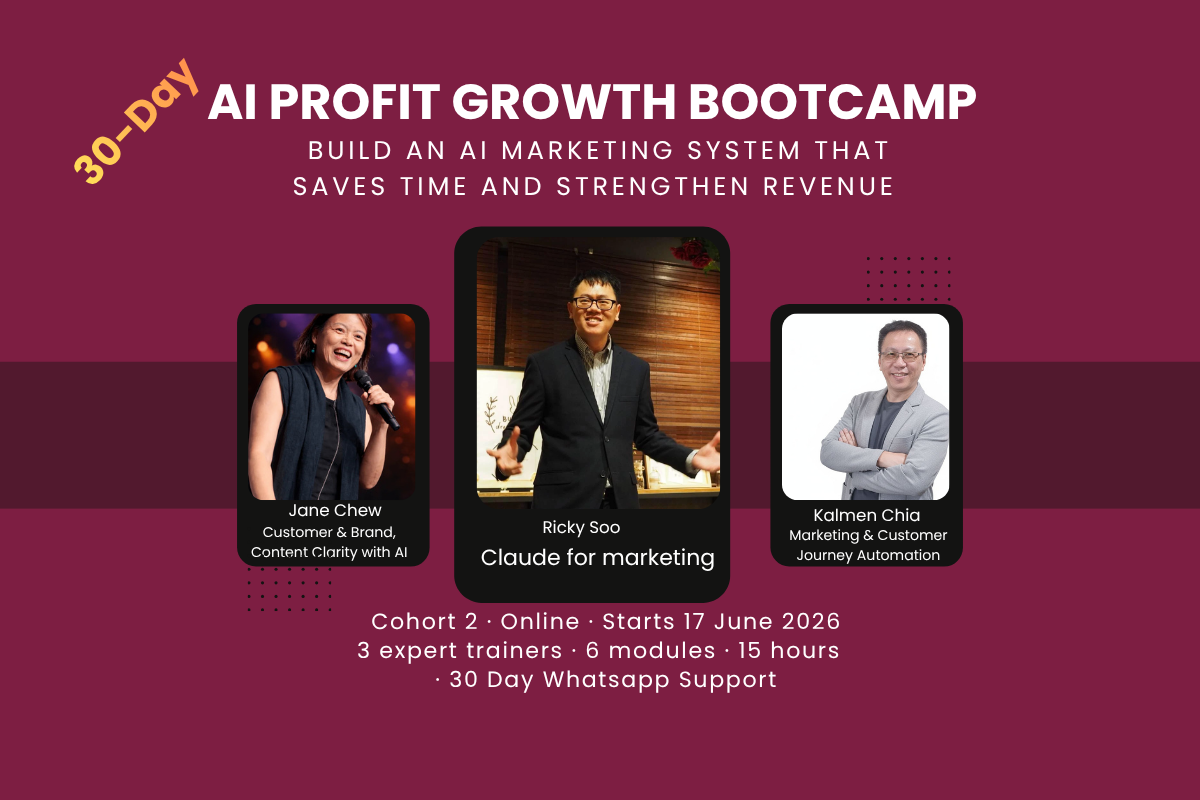
Build Your AI Marketing System That Attracts, Follows Up and Converts.
Seven modules. Three expert trainers. 15 hours of guided implementation. Walk away with a working AI Customer Profit Engine — not just notes.
Seven Modules. Two Distinct Layers. One Connected System.
The morning session covers strategy, clarity, and content planning. The afternoon session focuses on production, build, and automation. Every module ends with a real, usable output.
ICP, offer sharpening, competitor review, authority direction, revenue model. Live AI clarity prompts.
What Claude projects are, what skills mean, 4 Clarity Skill templates installed and run live.
Content framework, 30-day plan, research workflow, repurposing logic — strategy before production.
Hands-on Claude project build, brand voice, prompt templates, production skill library installed.
Copywriting, visuals, proposals, image gen, short video, lead magnet — all produced in session.
Page structure, headline, lead capture, CTA, WhatsApp path — conversion-ready by end of session.
Auto-posting, WordPress, CRM, chatbot, email nurture, WhatsApp automation, KPI dashboard, 90-day roadmap. Everything from Modules 1–6 connected into one system.
Participants run live AI prompts using pre-built Clarity Skill templates to discover real answers about their business — not generic theory. Every prompt generates an output they keep and build on.
- ICP Discovery Prompt — Define your Ideal Customer Profile with specificity — demographics, triggers, fears, buying behaviour
- Customer Pain Extraction — Surface the top 5 commercially urgent problems your best customers face
- Customer Journey Mapping — Identify where customers drop off, lose trust, or fail to convert
- Profitable Segment Filter — Identify which segment generates the highest lifetime value with the least friction
- Offer Positioning Stress-Test — Run your current offer through an AI prompt that challenges clarity, urgency, and differentiation
- Competitor Gap Analysis — Review competitor positioning and identify where your differentiation opportunity sits
- Authority Direction — Define where you lead, what you own, and how your authority gets built consistently
- Revenue Model Review — Map current revenue streams and identify the highest-leverage path to growth
Claude is introduced at the conceptual and strategic level — what projects are, why skills matter, and how to think about AI as a business tool rather than a chat interface. Participants install their first 4 Clarity Skills and run them live.
- What is a Claude Project — How projects work, why context matters, and why one-off prompting limits results
- What are Skills — The difference between a prompt and a reusable skill, and why skills are a competitive advantage
- AI as Strategic Tool — How to think about Claude as a co-pilot that works with strategy, not instead of it
- Clarity vs Production Mode — When to use AI to think versus when to use AI to build
- ICP Clarity Skill — Reusable prompt that generates a fresh ICP whenever a customer segment evolves
- Offer Positioning Skill — Stress-tests any offer against customer urgency and competitor context
- Content Engine Mapping Skill — Maps content to the customer journey stages automatically
- Competitor Review Skill — Structured prompt for ongoing competitor monitoring and gap identification
Building directly from the ICP and offer clarity established in Modules 1 and 2, this session turns strategic clarity into a content plan. Participants define their content pillars, build a 30-day calendar, and map research workflows — all before any content is produced.
- Content Framework — Map content to the 6 stages of the customer journey using the ICP as the foundation
- 30-Day Content Plan — Build a realistic, platform-specific content calendar tied to customer pain points and your offer
- Content Pillar Definition — Define 3–4 content pillars that reinforce authority and attract the right audience
- Platform Selection Logic — Decide where to show up — based on where your audience actually spends attention
- AI Market Research — Identify trends, customer pain signals, and content gaps in your market
- Content Repurposing Logic — One input, 5 platform-ready outputs — understand the workflow before building it
- Document Handling with AI — Extract insights from PDFs, proposals, and reports to feed content planning
- Competitor Content Audit — Analyse what competitors are publishing and identify your differentiation angle
Everything from the morning session gets installed into a fully configured Claude project. Participants move from strategic clarity to a production-ready AI system with brand voice, customer profile, and reusable production skills built in.
- Claude Project Configuration — Hands-on technical setup — not a demo, not conceptual
- Brand Voice Installation — Feed tone, style rules, and language preferences so every output sounds on-brand
- Customer Profile Upload — Embed the ICP into the project so every production prompt is customer-aware
- Context Window Management — Structure inputs for consistently better outputs every time
- Content Brief Generator — Turns a topic into a full content brief in 60 seconds
- Copywriting Skill Template — Reusable prompt for on-brand copy across email, social, and web
- Repurposing Workflow Skill — One content input → 5 platform-ready formats, automated
- Proposal Generator Skill — Client proposals faster with consistent quality
The full production session. Using the configured AI project and production skills, participants create real business assets — copy, visuals, proposals, a lead magnet, and short video content. Everything produced is ready to publish or share by end of day.
- AI-Assisted Copywriting — Headlines, body copy, email sequences, social posts — on-brand, at speed
- Marketing One-Pager — Completed, on-brand, ready to publish or share by end of session
- Sales Proposal Generation — Professional proposals faster — scope, pricing, outcomes, tone-matched
- Sales Presentation Creation — Persuasive slide decks — structure, narrative, speaker notes, visual direction
- Brand Visual Templates — Canva-ready templates for consistent visual identity across all channels
- Image Generation — On-brand marketing visuals and social graphics using AI image tools
- Short Video Generation — Scripts, captions, and video assets for social media using AI video tools
- Digital Lead Magnet — A downloadable guide, checklist, or scorecard that captures leads and builds authority
Build the landing page that connects all of Day 1’s assets — the offer, the lead magnet, and the WhatsApp conversion path — into a single conversion-focused page. Designed to move visitors into enquiries without a salesperson involved.
- Landing Page Strategy — Which page type fits your offer, audience intent, and conversion goal
- Headline Architecture — Write a headline that stops the right visitor and speaks to their problem
- Page Section Flow — Above-the-fold layout, trust signals, social proof placement, and CTA sequencing
- Mobile-First Optimisation — Ensure the page converts on mobile where most SME leads come from
- Lead Capture Form Design — What to ask, when to ask, how to reduce friction without losing lead quality
- CTA Copywriting — CTAs that convert curious visitors into enquiries without sounding pushy
- WhatsApp Conversion Path — Connect page directly to WhatsApp for faster enquiry follow-up
- Lead Magnet Integration — Connect the Day 1 lead magnet to the lead capture flow for higher opt-in rate
The final and largest session. Every component from Modules 1–6 is mapped and connected through an automation layer that makes the whole system run without manual effort. Every participant leaves with a working operating system, not just a plan.
- Social Media Auto-Posting — Schedule and auto-publish across Facebook, LinkedIn, Instagram, and WhatsApp
- WordPress Integration — Connect the AI content workflow to your website for automated or semi-automated publishing
- Content Repurposing Automation — One input, multiple platform outputs — the full workflow automated end-to-end
- AI Workflow Design — Map your marketing process and identify exactly where automation adds the most leverage
- CRM Connection — Capture every lead from landing page, WhatsApp, and social channels automatically
- Lead Follow-Up Chatbot — AI chatbot that qualifies, responds to, and nurtures leads without waiting for a human
- Email Nurture Sequence — Automated email series that educates, builds trust, and moves leads toward a buying decision
- WhatsApp Automation — Automated responses and follow-up sequences for every incoming enquiry
- KPI Dashboard — 5–7 metrics that tell you whether the AI marketing system is working — in a simple, readable dashboard
- AI for Customer Research — Ongoing workflow to monitor customer behaviour, competitor signals, and market trends
- Intelligence Layer — Feed CRM and KPI data back into content, targeting, and offer decisions automatically
- Document Handling Automation — Automate intake, processing, and routing of proposals, contracts, and enquiries
- Operating SOP — Document the entire AI marketing workflow so it runs consistently without managing every step
- System Connection Check — Verify all Modules 1–6 outputs are connected and running as one system
- 90-Day Implementation Roadmap — Week-by-week priority plan for implementing and improving after the bootcamp
- Post-Bootcamp Momentum Plan — What to do in Week 1, Month 1, and Month 3 to compound results
Three Specialists. One Connected System.
Strategy feeds production. Production feeds automation. Automation feeds results. Each trainer owns their layer — and the handoffs are deliberate.
AI Strategy Coach and Founder of DigitalAI Business Club. 30+ years in CRM, loyalty, and customer strategy (OCBC, OgilvyOne, Aimia). Leads the strategy, clarity, and content planning layer — participants arrive at lunch knowing exactly who they serve, what to say, and what to publish.
Specialist in AI-assisted content production, copywriting, brand visuals, proposal generation, image generation, short video, and landing page design. Takes the morning’s strategic outputs and installs them into a fully configured AI production system.
Expert in AI workflow automation, social media auto-posting, CRM integration, chatbot lead follow-up, WordPress connection, email nurture systems, and operating SOPs. Connects every asset from Modules 1–6 into one automated, measurable operating system.
Choose Your Format. Same Outcomes, Different Pace.
Physical is recommended for maximum build momentum. Online is available for evening sessions. Both include 30-day WhatsApp coaching and a free 1-year DigitalAI Membership.
- 2 full Saturdays in-room · 7 hours each
- 15 hours total guided implementation
- All 7 modules · 3 expert trainers
- 25+ AI Profit Marketing Skills installed
- 30-day WhatsApp coaching support
- Free 1-year DigitalAI Business Club Membership
- All materials, templates & prompt libraries
- DigitalAI members enjoy 10% discount
- 15 hours across evening sessions
- Same 7 modules · 3 expert trainers
- 25+ AI Profit Marketing Skills installed
- 30-day WhatsApp coaching support
- Free 1-year DigitalAI Business Club Membership
- All materials, templates & prompt libraries
- WhatsApp for full timetable and format details
Tool requirement for all formats: Claude Pro account · USD $20/month (separate)
Find Out Where Your Marketing Is Leaking Revenue First.
The free AI Profit Revenue Leak Assessment takes 10 minutes and maps your gaps directly to the bootcamp modules that address them — before you commit.
Take the Free Revenue Leak Assessment →Free · No credit card · Instant personalised results
Frequently Asked Questions
How is Day 1 structured?
Day 1 runs in two halves. The morning (~4 hours) covers Modules 1, 2, and 3 — customer clarity, offer positioning, AI orientation, clarity skills installation, and content strategy planning. The afternoon (~3 hours) covers Modules 4 and 5 — hands-on AI project configuration and the full production session where copy, visuals, proposals, images, video, and a lead magnet are all built.
What exactly will I build across the two days?
Day 1 Morning: ICP profile, offer positioning statement, 4 Clarity Skills installed, 30-day content plan, content pillars defined. Day 1 Afternoon: Configured AI project with brand voice and production skills, marketing one-pager, sales proposal template, sales presentation, AI image assets, short video content, and a digital lead magnet. Day 2: Landing page with lead capture and WhatsApp path, plus the full automation operating system — social auto-posting, CRM, chatbot, email nurture, WhatsApp automation, KPI dashboard, operating SOP, and 90-day roadmap.
Do I need AI experience or technical skills?
No prior AI experience is required. The bootcamp is built for business owners, not developers. The morning session starts at the strategic and conceptual level before any technical work begins. The only tool you need is a Claude Pro account at USD $20/month. Every module is guided — you build in real time with trainer support in the room.
What happens after the bootcamp ends?
You receive 30 days of WhatsApp coaching support after both sessions — covering implementation questions, troubleshooting, and maintaining momentum. A free 1-year DigitalAI Business Club Membership is included, giving you access to ongoing resources, tools, and community support. The final session ends with a 90-day implementation roadmap so you know exactly what to do in Week 1, Month 1, and Month 3.
Is the online format the same as physical?
Both formats cover all 7 modules with the same 3 trainers and 25+ AI skills installed. The physical format delivers 15 hours across 2 full Saturdays with in-room trainer access and same-day troubleshooting. The online format spreads the same content across evening sessions for flexibility. Physical is recommended for maximum build momentum — online suits those who cannot commit full Saturdays.
Two Saturdays. One Working AI Marketing System. Zero Guesswork.
Physical seats are limited per cohort. If the dates work and the gaps are real, the clearest next step is to reserve your place or WhatsApp Jane directly.
Physical · 20 & 27 June 2026 · Malaysia · Limited seats · Online also available from 17 June