
Claude AI for Business: 3-Level Training Pathway
Choose One Level Individually — Or Build a Complete AI Capability Journey
A practical, business-first Claude AI training series for companies, SME owners, managers and employees who want to move from basic AI usage to real productivity, sales enablement, data insight, business apps and AI agents.
Most organisations are no longer asking whether AI is useful. The real question is: how do we train different teams to use AI at the right level?
A business owner or manager needs Claude for daily writing, content creation, and decision support. An operations, sales, or admin team needs Claude for sales proposals, documents, data reports, and Excel — applied to a real business process they choose, not a generic case study. A digital transformation lead needs to go further — building apps, automations and AI agents wired to a real system.
One Claude Programme. Three Commercially Separate Courses.
Claude AI for Business is designed as a 3-level training pathway. Each level is a complete 1-day course and may be sold individually, delivered separately, or combined into a structured AI transformation journey for teams.
This makes it easier for companies to train the right people at the right depth — from beginner users to advanced solution builders.
Level 1 is delivered by Jane Chew. Levels 2 and 3 are delivered by Ricky Soo or Kalmen Chia, assigned per engagement — bringing complementary expertise across business strategy, sales enablement, and technical implementation.
Business Automation You Will Walk Away With
This is not just AI training for employees on how to use a chatbot. Each level is built around a real business automation workflow — a task your team already does, streamlined from start to finish during the training day, so you see AI for business productivity in your own numbers, not someone else’s case study.
Real content, written and repurposed in your own voice — plus a connected AI coworker and a delegated task you run yourself.
Your own sales or reporting process, turned into proposals, reports and a workflow that keeps running — packaged as a Skill your whole team can install.
A working prototype and an AI agent wired to a real system, plus a 30/60/90-day roadmap ready for leadership sign-off.
Choose the Right Claude Course Level
Each level has a different business outcome. Participants do not need to attend all three courses unless the company wants to build a complete AI capability pathway.
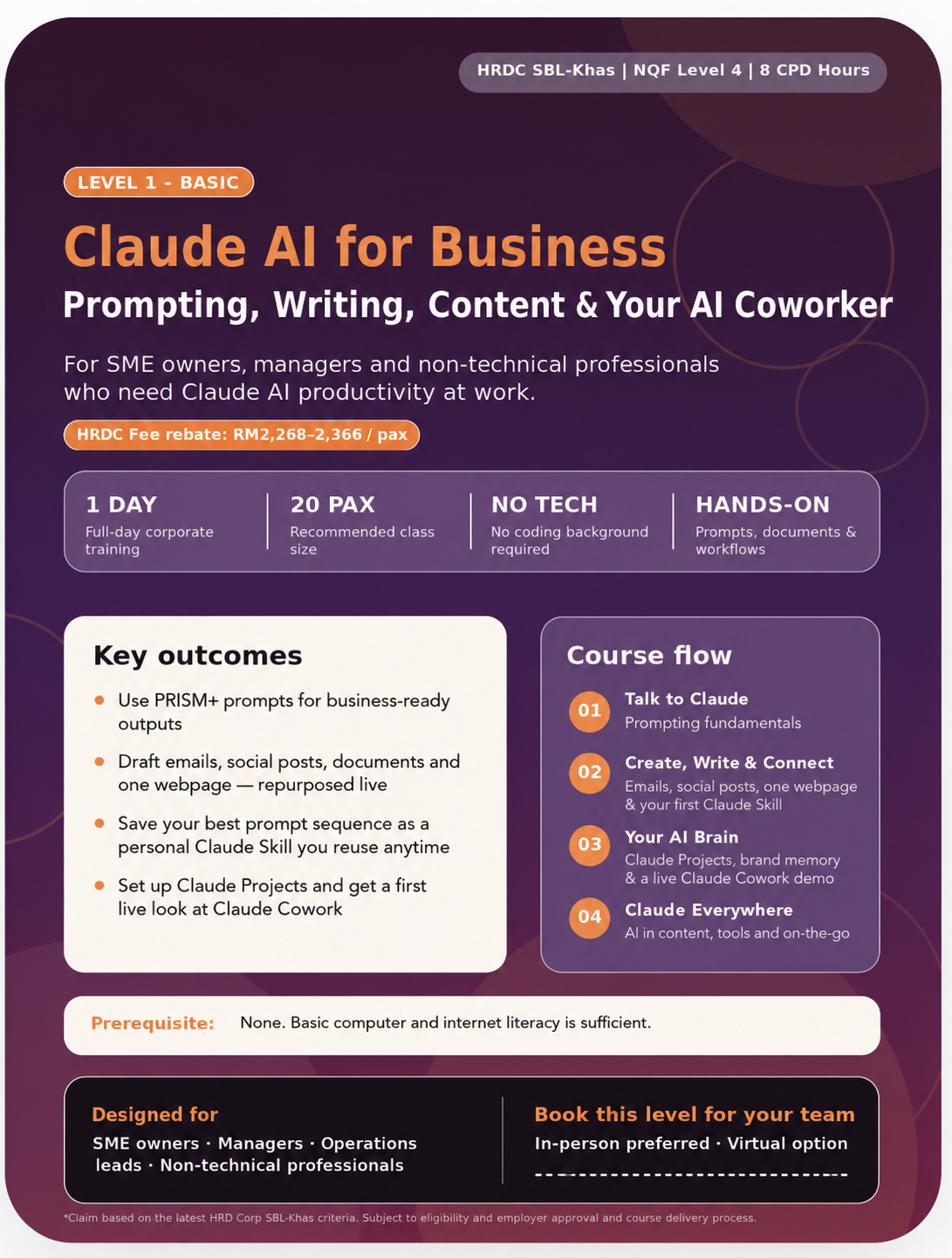
Prompting, Writing, Content & Your AI Coworker
Best for business owners, managers and non-technical professionals who want to use Claude confidently for daily work — including writing, content, and communication. No technical background required.
- Master PRISM+ prompting for business results
- Write emails, social posts and brand-voice content — and build one webpage live as a Claude Artifact
- Save your first content formula as a personal Claude Skill
- Configure a Claude Project, connect Cowork to one app, and run a delegated task yourself
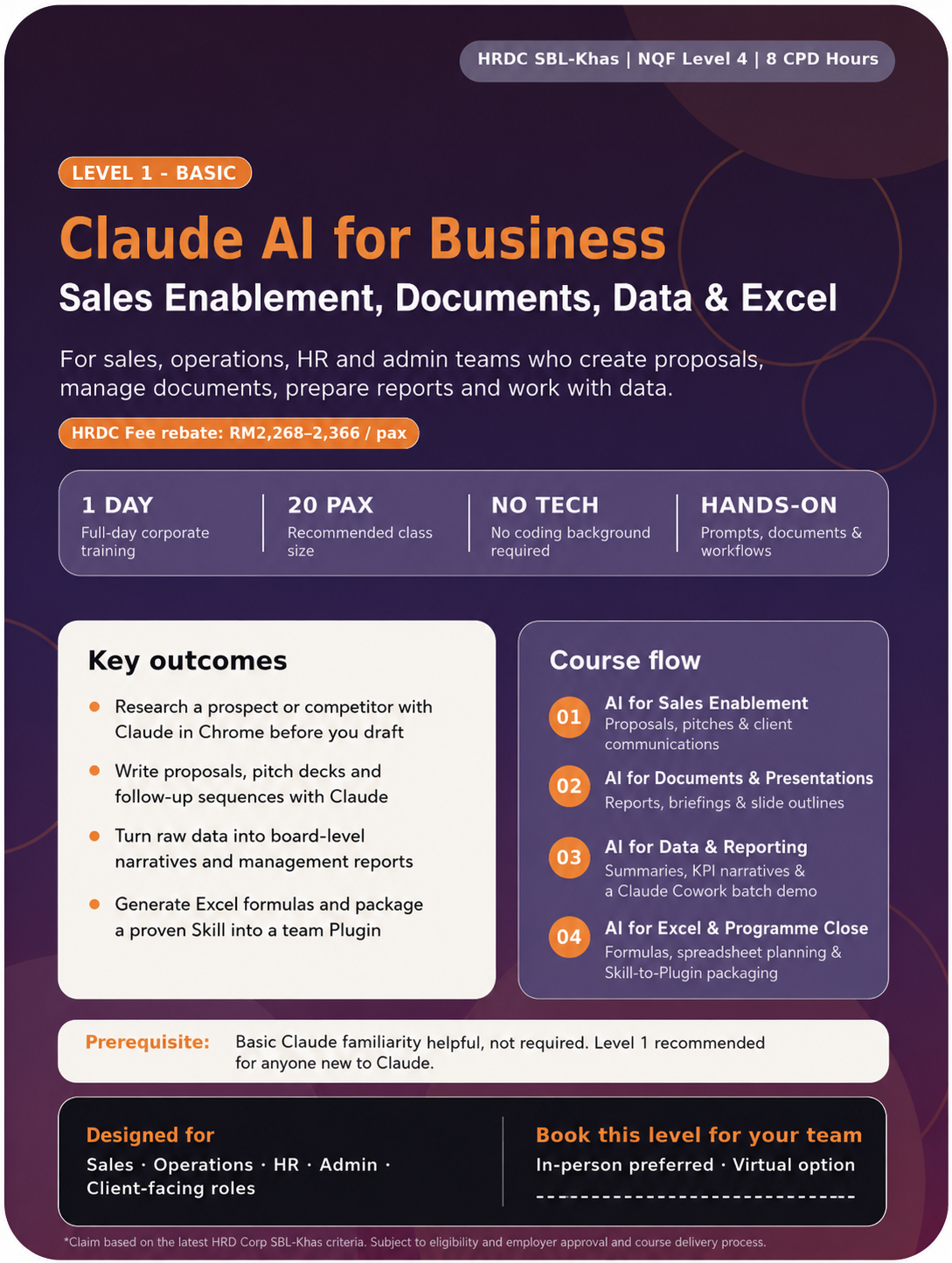
Sales Enablement, Documents, Data & Excel
Best for sales, operations, HR and admin teams who create proposals, manage documents, prepare reports, or work with spreadsheet data. Requires a paid Claude plan and a laptop confirmed able to run Claude Cowork.
- Bring your own process — choose from 6 tracks: sales, inventory, accounts, HR, projects or service
- Research a real prospect or competitor live with Claude in Chrome before you draft
- Turn raw data into board-ready management narratives
- Package your reporting workflow as a Skill your whole team can install as a Plugin
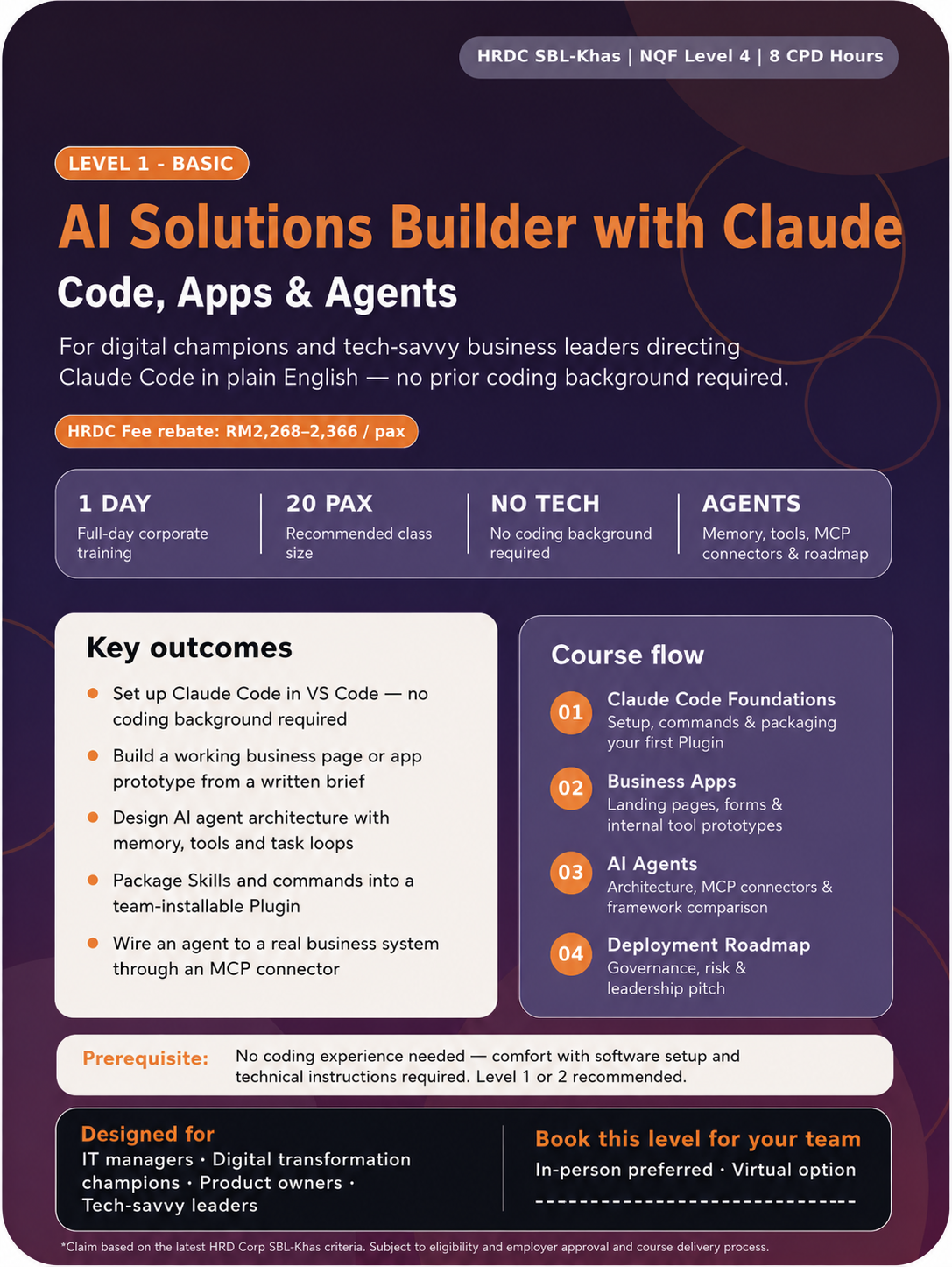
Code, Apps & Agents
Best for business leaders who are IT savvy, digital champions, product owners and tech-savvy leaders who want to build AI solutions for their organisation. Requires Claude Code pre-installed before the day.
- Direct Claude Code in plain English — no prior coding needed
- Build a working prototype from your own written brief
- Wire an AI agent to a real business system through an MCP connector
- Leave with a 30/60/90-day deployment roadmap ready for leadership
Programme Comparison at a Glance
| Course Level | Programme Title | Best For | Business Outcome | Duration |
|---|---|---|---|---|
| Level 1 Basic | Claude AI for Business: Prompting, Writing, Content & Your AI Coworker |
SME owners, managers, non-technical professionals, executives and supervisors | Participants leave with a personal PRISM+ prompt library, real content written in their own brand voice, a saved Claude Skill, a configured Claude Project connected to a live business app, and a 30-Day AI Adoption Plan. | 1 full day (8 hours) |
| Level 2 Intermediate | Claude AI for Business: Sales Enablement, Documents, Data & Excel |
Sales, operations, HR and admin teams who create proposals, manage documents, prepare reports or work with spreadsheet data | Participants leave with a real proposal, a restructured document and presentation outline, a management report, an Excel toolkit, and a reporting Skill packaged as a team-installable Plugin — all built against the business process they chose that morning. | 1 full day · 6 hours facilitated training |
| Level 3 Advanced | AI Solutions Builder with Claude: Code, Apps & Agents |
IT managers, digital transformation leads, product owners, tech-savvy business leaders and internal AI champions | Participants leave with a working prototype, an AI agent wired to a real business system, a justified framework choice, and a leadership-ready 30/60/90-day deployment roadmap. | 1 full day · 6 hours facilitated training |
Which Level Should Your Team Attend?
Start with Level 1
Choose Level 1 when your team is new to Claude or using AI inconsistently. This gives everyone a shared prompting framework, practical AI writing skills, basic content creation confidence, and a first hands-on Cowork connection. A Pro/Team Claude plan is recommended for the Session 3 Cowork and connector exercise.
Move to Level 2
Choose Level 2 when your sales, ops, or admin team needs stronger outputs for proposals, client documents, data reports, and Excel. Participants bring their own real business process (one of six tracks) and need a paid Claude plan plus a laptop confirmed able to run Claude Cowork, checked 48 hours before training.
Advance to Level 3
Choose Level 3 when your organisation wants internal AI builders who can prototype apps, explore automation, and design AI agents responsibly. This is still a non-technical programme — participants direct Claude Code in plain English, not by writing software from scratch. Claude Code must be pre-installed before the day. Teams with professional developers who want to go further can ask about our advanced technical track (see FAQ).
Claude AI for Business:
Prompting, Writing, Content & Your AI Coworker
“Think with Claude — Clarity Before You Prompt, Confidence After.”
This course helps participants move from casual AI usage to structured, business-ready Claude usage. Participants learn to prompt effectively, write and communicate faster, create content and social posts, and set up a working AI coworker — a configured Claude Project connected to a real business app — all without any technical background.
Who Should Attend
SME owners, business managers, operations leads, executives, supervisors and non-technical professionals who want to use Claude for daily productivity, writing, content creation, summarising, decision support, and business communication. No technical background required. A Pro or Team Claude plan is recommended so participants can use Claude Projects and Cowork in Session 3; a Google account (or equivalent) is also needed for that session’s live connector exercise.
What Participants Will Learn
- Apply a structured thinking process — identifying the real business problem and choosing whether to automate or amplify it — before using Claude for any task
- Apply the PRISM+ prompting framework to produce business-ready Claude outputs for everyday work tasks
- Construct effective prompts for emails, summaries, analysis and decision support relevant to their own role
- Produce social media posts, email content and brand-voice copy using Claude, and repurpose one piece of content into multiple formats
- Save a reusable content workflow as a personal Claude Skill for repeat use
- Draft and improve professional documents and presentations using Claude, including one webpage built live as a Claude Artifact
- Configure a Claude Project with custom instructions, brand voice and uploaded company documents
- Connect Claude Cowork to one external business application and observe — and take part in — a delegated, multi-step task run end to end
- Identify five practical AI quick wins for their role and build a 30-Day AI Adoption Plan
Level 1 Course Flow
| # | Time | Session Title | Key Outputs |
|---|---|---|---|
| 1 | 9:00 – 10:30 AM | Talk to Claude Mindset & Prompting for Business Results |
Mindset worksheet (real problem, automate vs. amplify) · 3 tested PRISM+ prompts · Personal prompt starter library |
| 2 | 11:00 AM – 12:30 PM | Create, Write & Connect Emails, Social Posts, Documents & One Webpage |
1 real email or document · 2 social posts · Brand voice prompt · 1 webpage built as a Claude Artifact · 1 personal Claude Skill saved (content repurposing formula) |
| 3 | 1:30 – 3:00 PM | Your AI Brain Claude Projects, Cowork & a Connected Workflow |
Configured Claude Project · Uploaded company document · Personalised system prompt · 1 connector linked (e.g. Google Drive) · Capstone: one delegated multi-step task run through Cowork |
| 4 | 3:30 – 5:00 PM | Claude Everywhere Your AI Coworker & 30-Day Plan |
5 AI quick wins identified · Completed 30-Day AI Adoption Plan · Week 1 commitment |
Claude Toolkit Used This Level
Beyond the workflow, here is exactly which part of Claude each session puts to work — so you know precisely what your team is being trained on.
| Session | Claude Element(s) Used |
|---|---|
| 1 · Talk to Claude | Claude.ai chat + PRISM+ prompting framework |
| 2 · Create, Write & Connect | Claude.ai chat · Claude Artifacts (live webpage preview) · Claude Skills (saved content repurposing formula) |
| 3 · Your AI Brain | Claude Projects (brand memory & documents) · Claude Cowork (hands-on connector + a live delegated capstone task) |
| 4 · Claude Everywhere | Claude.ai chat, applied to your own Project and Skill as daily habits |
Level 1 Signature Automation Workflow
Beyond individual skills, Level 1 chains its four sessions into one visible outcome — proof of AI for business productivity your team can point to by the end of the day.
Content Marketing Sprint
- 1Think through a real problem first, then build your PRISM+ prompt library — 3 tested prompts for business results (9:00–10:30)
- 2Draft one real email or document in your brand voice, repurpose it into 2 social posts and 1 webpage Artifact you preview live, then save the whole formula as a personal Claude Skill you can run again next week (11:00–12:30)
AI Coworker Activation
- 1Configure a Claude Project with your brand voice and one uploaded company document, connect Cowork to one business app, and run a delegated, multi-step capstone task yourself (1:30–3:00)
- 2Identify 5 AI quick wins for your role and build your 30-Day AI Adoption Plan (3:30–5:00)
Claude AI for Business:
Sales Enablement, Documents, Data & Excel
“Delegate with Claude — Automate Your Operations, Keep Control.”
This course turns Claude into a practical business output engine for sales, operations, and admin teams. Participants produce real deliverables across four high-value business functions: sales proposals and client documents, business reports and presentations, data summaries and management narratives, and Excel formula support — then make the whole workflow repeatable.
Choose Your Track — Bring a Real Process, Not a Case Study
You pick one business process before the day and produce that process’s real documents, reports and spreadsheets throughout: T1 Sales & Marketing (proposal, quotation, follow-up sequence, pipeline tracker) · T2 Order Fulfilment & Inventory (order confirmation pack, stock report, reorder tracker) · T3 Accounting & Invoicing (collection letters, aged-receivables summary, cash tracker) · T4 HR, Payroll & Attendance (staff briefing, attendance summary, claims tracker) · T5 Project Management & Timesheets (project status report, timesheet summary, job-cost tracker) · T6 Service & Workshop (job-card pack, service throughput report, parts tracker). In-house cohorts can run a single vertical track — FMCG field sales, clinic management, fleet/GPS, or manufacturing BoM and MPS — on the company’s own data.
Who Should Attend
Sales professionals, operations staff, HR teams, admin staff, and business support functions who create proposals, manage client documents, prepare management reports, or work with spreadsheet-based information regularly. A paid Claude plan (Pro or higher) is required, and your laptop must be confirmed able to run Claude Cowork — checked 48 hours before the training day. Level 1 or equivalent fluency with Claude Chat and PRISM+ is recommended.
What Participants Will Learn
- How to use Claude in Chrome to research a prospect or competitor directly in the browser before you draft a single word of the proposal
- How to produce business proposals, quotations, pitch decks, and client presentation outlines using Claude
- How to draft follow-up sequences, client briefing notes, and sales communication tailored to different audiences
- How to adapt one business document for internal, client-facing, and board-level readers
- How to turn raw data and business report text into written management summaries and KPI narratives
- How to construct and explain Excel formulas from plain-language descriptions, and plan spreadsheet structures for trackers and dashboards
- How to set up a Claude Cowork workspace that mirrors your business, with approval settings matched to task risk
- How to connect Claude to where your data already lives, and schedule a report that produces itself — without a computer switched on
- How to package a proven reporting workflow as a Claude Skill, and then as a Plugin your whole sales or ops team can install — not just you
Level 2 Course Flow
| # | Time | Session Title | Key Outputs |
|---|---|---|---|
| 1 | 9:00 – 10:30 AM | AI for Sales Enablement Proposals, Pitches & Client Communications |
1 prospect/competitor research brief (via Claude in Chrome) · 1 proposal or pitch deck outline · Client follow-up sequence · Configured Claude Cowork workspace with approval settings recorded |
| 2 | 11:00 AM – 12:30 PM | AI for Documents & Presentations Reports, Briefings & Slide Outlines |
1 restructured business document · 6-slide presentation outline with speaker notes · Audience-adaptation exercise (internal / client / board) · First draft of a reusable Claude Skill |
| 3 | 1:30 – 3:00 PM | AI for Data & Reporting Summaries, KPI Narratives & Management Reports |
1 data summary · Board-level management narrative · 3 reporting prompt templates · 1 connector wired (scoped, read-focused) · 1 scheduled report that runs itself |
| 4 | 3:30 – 5:00 PM | AI for Excel & Programme Close Formulas, Spreadsheet Planning & Week 1 Commitment |
3 Excel formulas generated or explained · Spreadsheet structure plan · Skill packaged into a team-installable Plugin · One-page AI Use & Approval Policy · 30-Day Automation Plan |
Claude Toolkit Used This Level
Beyond the workflow, here is exactly which part of Claude each session puts to work — so you know precisely what your team is being trained on.
| Session | Claude Element(s) Used |
|---|---|
| 1 · AI for Sales Enablement | Claude in Chrome (prospect/competitor research) · Claude.ai chat · Claude Cowork (workspace + approval settings, hands-on) |
| 2 · AI for Documents & Presentations | Claude.ai chat · Claude Artifacts (presentation outline) · Claude Skills (first draft — by description, screen recording, or adapting an existing Skill) |
| 3 · AI for Data & Reporting | Claude.ai chat · Claude Cowork (connector setup + scheduled recurring report, hands-on) |
| 4 · AI for Excel & Programme Close | Claude.ai chat · Claude Skills → Plugins (packaged, team-installable) |
Level 2 Signature Automation Workflow
Level 2 chains its four sessions into one sales enablement and reporting workflow, built against the real process you chose — the exact deliverables a sales or operations leader wants to see before approving the training.
Proposal-to-Presentation Workflow
- 1Research a real prospect or competitor using Claude in Chrome, draft a proposal or pitch outline and a follow-up sequence, then set up a Claude Cowork workspace with approval settings matched to your business (9:00–10:30)
- 2Restructure the proposal into a 6-slide presentation outline with speaker notes, adapted for internal, client and board readers, and draft the first version of a reusable Skill (11:00–12:30)
Data-to-Boardroom Workflow
- 1Turn raw data into a written summary, a board-level management narrative, and 3 reusable reporting prompt templates, then wire a connector to where the data lives and schedule a report that runs itself (1:30–3:00)
- 2Generate or explain 3 Excel formulas, plan a tracker or dashboard structure, package your reporting Skill into a team-installable Plugin, and draft a one-page AI Use and Approval Policy alongside your 30-Day Automation Plan (3:30–5:00)
AI Solutions Builder with Claude:
Code, Apps & Agents
“Build with Claude — Business Tools, Dashboards & AI Agents.”
This advanced course helps participants move from using AI to building with AI. Designed for internal digital champions and tech-savvy business leaders who want to create prototypes, apps, automations and AI agents using Claude Code.
Choose Your Track — What You’ll Build
If you attended Level 2, bring the same process forward — the workflow you automated there is what you build against here. Each track pairs one business decision with one app and one agent you leave with: T1 Sales & Marketing — which leads deserve attention this week → pipeline tracker app + weekly lead-status agent · T2 Order Fulfilment & Inventory — what to reorder and what’s stuck → stock/order-status tool + low-stock alert agent · T3 Accounting & Invoicing — who to chase and how exposed you are → aged-receivables view + weekly collections agent · T4 HR, Payroll & Attendance — where overtime and absence is going → attendance/leave tool + weekly exception agent · T5 Project Management & Timesheets — which jobs are slipping and which make money → job margin tracker + overrun-flag agent · T6 Service & Workshop — bay utilisation, parts movement, throughput → service throughput tool + daily job-card agent.
Who Should Attend
IT managers, digital transformation champions, product managers, technical business leaders and professionals who want to build AI tools, business apps, automations and AI agents for their organisation. Claude Code must be installed and verified working before the training day — a pre-setup guide is provided, with a check 48 hours out.
What Participants Will Learn
- How to set up and operate Claude Code in — operating modes, slash commands, Skills and Plugins
- How to package your own Skills and commands into a Plugin your whole team can install, so one build benefits everyone, not just you
- How to design and build a working business application prototype — a landing page, form, or internal tool — from a written brief, with a readable version history you can hand over
- How to design a basic AI agent architecture incorporating memory, tools and task loops
- How to integrate an AI agent with a real business system using an MCP connector (sandbox or test credentials only in class, per PDPA)
- How to evaluate agent frameworks — Claude Code, LangChain, CrewAI, AutoGen, Make, n8n — against your own defined business need, and justify one choice in a framework selection matrix
- How to formulate a 30/60/90-day AI deployment roadmap with governance and risk considerations, and present it to organisational leadership
Level 3 Course Flow
| # | Time | Session Title | Key Outputs |
|---|---|---|---|
| 1 | 9:00 – 10:30 AM | Claude Code Foundations Setup, Skills & Commands |
Initialised Claude Code project · 3 slash commands demonstrated · First build output · Introduction to packaging a Skill into a Plugin |
| 2 | 11:00 AM – 12:30 PM | Building Business Apps with Claude Code Prototypes, Pages & Internal Tools |
Working prototype (landing page, form, or internal tool) built from participant’s own brief, saved as a versioned project with a readable change history |
| 3 | 1:30 – 3:00 PM | Building AI Agents for Business Automation Architecture, Frameworks & Responsible Design |
AI agent architecture design · First MCP connector wired (sandbox/test credentials only) · Individually justified framework selection matrix · Responsible deployment checklist |
| 4 | 3:30 – 5:00 PM | Deploying AI Solutions in Your Business Roadmap, Governance & Leadership Pitch |
30/60/90-day AI deployment roadmap · Governance checklist · Leadership pitch summary |
Claude Toolkit Used This Level
Beyond the workflow, here is exactly which part of Claude each session puts to work — so you know precisely what your team is being trained on.
| Session | Claude Element(s) Used |
|---|---|
| 1 · Claude Code Foundations | Claude Code · Skills · Plugins (technical build & packaging) |
| 2 · Building Business Apps | Claude Code (prototype build from a written brief, with build versioning) |
| 3 · Building AI Agents | Claude Code · MCP connectors (sandbox/test credentials) · framework selection matrix |
| 4 · Deploying AI Solutions | Claude Code (roadmap documentation) · Claude.ai chat (leadership pitch summary) |
Level 3 Signature Automation Workflow
This is where Claude Code training in Malaysia becomes tangible: participants leave with a real prototype and an agent concept, not just slides — proof for leadership that AI agents training produces something deployable, whether or not the team codes.
Idea-to-Prototype Build
- 1Set up Claude Code , run 3 slash commands, and see how a Skill gets packaged into a Plugin your team can install (9:00–10:30)
- 2Turn your own written brief into a working prototype — a landing page, form, or internal tool — saved as a versioned build with a readable history (11:00–12:30)
Agent-to-Roadmap Deployment
- 1Design a basic AI agent architecture, wire in one MCP connector to a real business system using sandbox credentials, and complete a framework selection matrix justifying your own choice against your business need (1:30–3:00)
- 2Build a responsible deployment checklist and draft your 30/60/90-day roadmap with a leadership pitch summary (3:30–5:00)
Delivery Format
| Programme Format | Each level is a standalone 1-day course. Companies may choose one level, selected levels, or all three levels as a complete AI capability pathway. |
| Delivery Mode | In-person preferred. Virtual or hybrid options may be arranged depending on course level and technical requirements. |
| Class Size | Up to 20 participants per cohort. Level 1: a second trainer co-trains once class size exceeds 10 participants. Level 2 and Level 3: a second HRD Corp TTT-certified trainer co-trains above 15 participants. A non-certified facilitator may provide additional floor support but does not satisfy either requirement. |
| Language | English throughout. Bahasa Malaysia support is available at Levels 1 and 2. |
| Participant Requirement | Level 1: own laptop with internet access, a Claude.ai account (Pro/Team tier recommended for the Session 3 Cowork and connector exercise), and a Google account (or equivalent) for that exercise. Level 2: a paid Claude plan and a laptop confirmed able to run Claude Cowork, checked 48 hours before training. Level 3: a paid Claude plan with Claude Code installed and verified before the training day. |
| HRDC Status | Level 2 and Level 3: HRD Corp SBL-Khas registered and approved, claimable subject to company eligibility and final documentation. Level 1: SBL-Khas claimable, subject to company eligibility, HRDC approval and final training documentation. |
Why Companies Choose This 3-Level Claude Training Pathway
Different Teams, Different AI Depth
Not everyone needs to build AI agents. Some employees need productivity and writing skills. Others need proposals and data reports. Some need to build solutions. The 3-level structure makes AI training practical and role-specific — with matched specialist trainers at each level.
Every Session Produces Real Outputs
Participants do not only listen to theory. They produce emails, social posts, proposals, documents, data summaries, Excel formulas, or working prototypes — depending on the level — using Claude during the session itself.
Bring Your Own Process, Not a Case Study
From Level 2 onward, participants choose one of six real business processes and work their own documents, reports and data all day. The same process can carry forward from Level 2 into Level 3, so the automation gets deeper, not repeated.
Supports Company-Wide AI Transformation
Companies can start with one level for a pilot cohort, then expand training across departments based on roles, readiness and business priorities — building a structured, documented AI capability pathway over time.
Frequently Asked Questions
Can each Claude course be sold individually?
Yes. Level 1, Level 2 and Level 3 are designed as commercially separate 1-day courses. Each can be sold and delivered separately, and Level 2 and Level 3 can be claimed under HRDC SBL-Khas, subject to company eligibility and HRDC approval.
Is Level 1 hands-on with Claude Cowork, or just a demo?
Hands-on. In Session 3 (Your AI Brain), every participant links one connector themselves (for example Google Drive) and runs a live, delegated, multi-step capstone task through Claude Cowork — not just watches the trainer do it. A Pro or Team Claude plan is recommended for this session, along with a Google account (or equivalent) for the connector exercise.
Does this training include real business automation, not just AI features?
Yes. Each level is built around a signature automation workflow and introduces a real Claude automation feature, not just chat prompting. Level 1 covers Claude Artifacts, a personal Claude Skill, and a hands-on Cowork connector with a delegated capstone task. Level 2 covers Claude in Chrome, a hands-on Cowork workspace with approval settings, a connector wired to where your data lives, a scheduled report that runs itself, and packaging a Skill into a team-installable Plugin. Level 3 covers Claude Code, custom Plugins and MCP connectors to real business systems. Each level ends with a working deliverable completed during the training day.
Do I need to bring my own business data?
At Level 1, no — every exercise works from provided samples and your own writing, and the Session 3 connector exercise uses a Google account (or equivalent) you already have. At Level 2 and Level 3, you choose one of six tracks (Sales & Marketing, Order Fulfilment & Inventory, Accounting & Invoicing, HR/Payroll & Attendance, Project Management & Timesheets, or Service & Workshop) and work against a real or sample dataset for that process. Your customer list does not need to be in a CRM — a Google Sheet, fed by a form or exported from whatever you use today, is enough. Any connector set up in class uses sandbox or test credentials only, and any credential used is revoked at the end of the session — this is a PDPA requirement, not optional.
What if my laptop can’t run Claude Cowork or Claude Code?
A setup and plan check is issued 48 hours before Level 2 and Level 3. Windows users need a compatible Windows version with the Virtual Machine Platform feature enabled (which requires administrator rights) — not every edition or device is supported. Mac users generally need no extra setup. If your laptop is managed by your company’s IT department, tell us at booking and we will send your IT team the setup instructions in advance. A participant whose machine is not ready cannot complete the hands-on exercises, so this is worth confirming before the morning of training.
Do participants need to attend Level 1 before Level 2?
Level 1 is recommended for anyone new to Claude, and it is where participants get their first hands-on Cowork connector experience. Level 2 can be attended independently by participants who already understand basic prompting and have some Claude familiarity, plus the paid plan and Cowork-capable laptop Level 2 requires.
Does Level 1 still cover content and marketing topics?
Yes. Level 1 includes social media post writing, brand voice prompting, basic email content, and a webpage writing exercise — all within Session 2: Create, Write & Connect. This makes Level 1 a complete daily productivity programme for SME owners and managers who handle their own content and communication.
Do participants need coding experience for Level 3?
No prior coding experience is required, but participants must be comfortable installing software, following technical instructions, and using a laptop for hands-on build activities. Claude Code must be set up and verified before the training day.
Where do Claude Skills and Plugins fit into the training?
They are built progressively across the pathway, each level going a step further. Level 1 introduces Claude Skills at a personal level — participants save a proven content formula as a reusable Skill for their own repeat use. Level 2 builds on that: participants draft a Skill in Module 2, then hands-on package it into a team-installable Plugin in Module 4 — so a colleague can install what one person built. Level 3 goes fully technical — building and packaging custom Skills and Plugins from scratch inside Claude Code.
When is Claude in Chrome introduced?
In Level 2, Session 1 (AI for Sales Enablement). Before drafting a proposal, participants use Claude in Chrome to research a real prospect or competitor directly in the browser — the natural point in the sales workflow where browser-based research happens, ahead of the writing.
Is there a more advanced, developer-level programme beyond Level 3?
Level 3 is deliberately built for non-technical business leaders and digital champions who direct Claude Code in plain English — it is not a software engineering bootcamp. For organisations with professional developers who want to go further into Claude’s SDK, custom agent frameworks, and production-grade deployment, an advanced technical track is available on request as a follow-on engagement. Contact Jane Chew to scope this for your technical team.
Which level is best for corporate staff?
Level 1 is best for general staff and managers who are new to Claude. Level 2 is best for sales, operations, HR, admin and business support teams. Level 3 is best for digital champions, IT managers and internal AI builders.
Is this course HRDC claimable?
Level 2 and Level 3 are HRD Corp SBL-Khas registered and approved, and claimable subject to company eligibility, HRDC approval and final supporting documentation. Level 1 is SBL-Khas claimable, subject to the same conditions.
Can a company run all three levels?
Yes. A company may run all three levels across three separate training days, three different months, or as a structured AI capability pathway — with different employee groups attending the level most relevant to their role, and the business process chosen at Level 2 carrying forward into Level 3.
Ready to Bring Claude AI Training to Your Company?
Choose one level for a focused team workshop, or build a 3-level Claude AI capability pathway for your organisation. Contact Jane Chew to discuss dates, format, trainer assignments, and HRDC documentation.
WhatsApp Jane Chew at 012-6669892WhatsApp / Call: 012-6669892
Email: janechew@digitalaibusinessclub.com
10xAIBusiness.com | DigitalAIBusinessClub.com