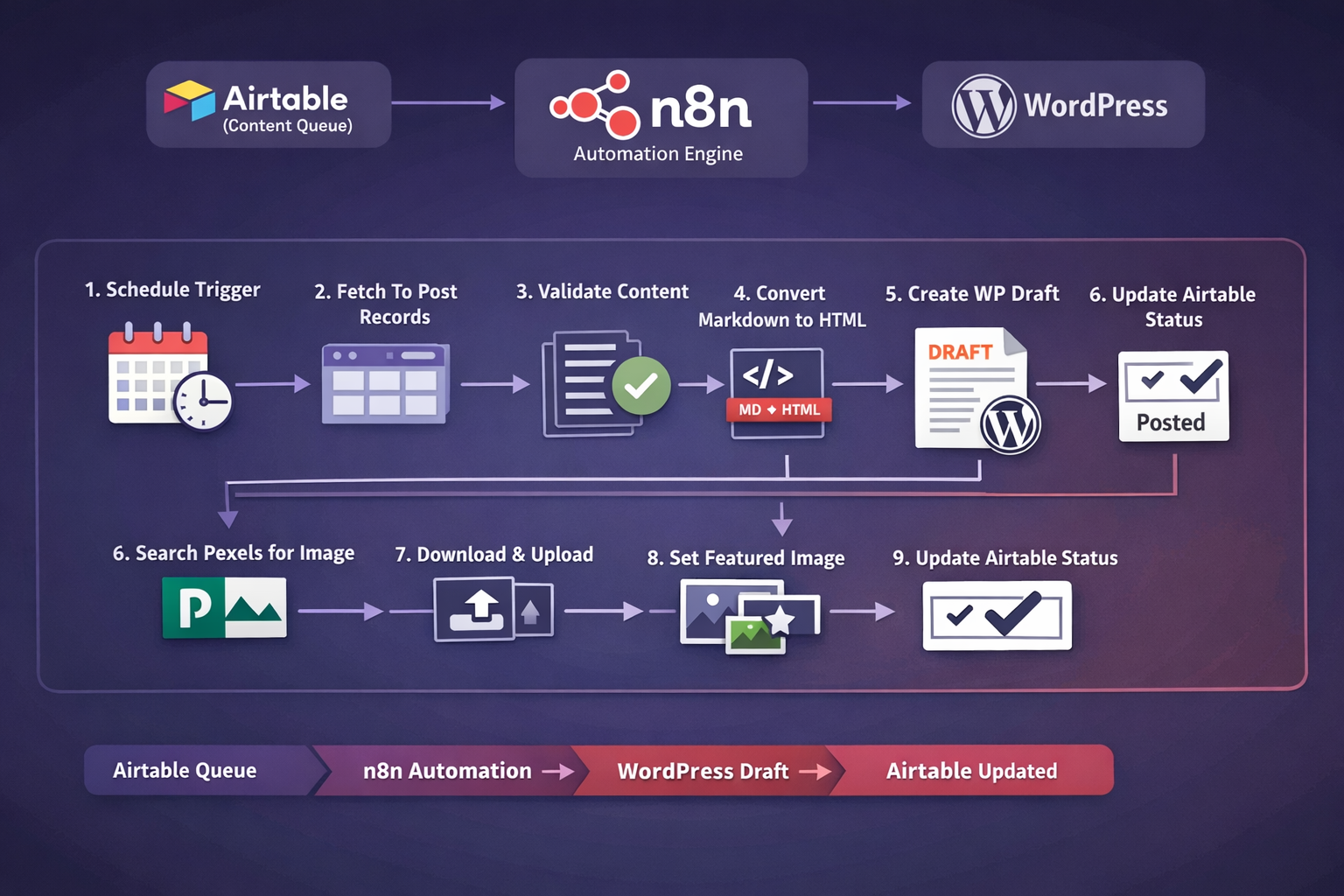
This workflow turns content publishing into a repeatable system: pull content from Airtable, format it correctly, create a WordPress draft, attach a featured image automatically, then mark it as posted.
Works with: Airtable (content queue) → n8n (automation) → WordPress (distribution) → Pexels (image source)
The real problem isn’t “posting.” It’s content operations. Most SME teams lose momentum because publishing is a manual, fragmented process: copy-paste, formatting fixes, image hunting, uploading media, setting featured images, then updating tracking sheets.
Strategic outcome: Airtable becomes your control tower, WordPress becomes the distribution engine, and n8n becomes the invisible operations layer that keeps everything consistent.
Status is “To Post” (limited batch per run).Draft-first control: You keep quality checks (internal links, categories, SEO fields) before publishing.
Schedule Trigger → Pull “To Post” → Validate → Set fields → Markdown→HTML → Create WP Draft → Search image → Download → Upload → Set featured → Mark Airtable as Posted
| Stage | What it does | Why it matters |
|---|---|---|
| Trigger | Runs on schedule | Consistency without relying on memory |
| Airtable Search | Finds records where Status contains “To Post” | Predictable publishing rhythm |
| Validation | Filters out records with missing Blog Post content | Avoids blank drafts |
| Markdown → HTML | Converts content into HTML | Preserves formatting |
| WordPress Draft | Creates a Draft post with title + HTML content | Quality control before publish |
| Pexels Image | Searches an image using Keyword | Speeds production |
| Media + Featured | Uploads image + sets featured_media | Ready-to-review draft package |
| Status Update | Marks Airtable record as Posted | Single source of truth |
Title, Keyword, Blog Post, StatusStatus = To Post| Symptom | Likely cause | Fast fix |
|---|---|---|
| No Airtable records pulled | Status filter mismatch / wrong table | Confirm field name “Status” + value “To Post”; test Airtable node alone |
| WordPress draft created but empty | Wrong content mapping | Check Blog Post mapping; verify Markdown→HTML input |
| Image not set as featured | Pexels returns no image / upload fails | Add fallback (default image or Needs Image status) + verify WP auth |
| Media upload fails (401/403) | WordPress auth/permissions | Use Application Password for editor/admin; confirm REST endpoint access |
Automation stack: n8n workflow integrating Airtable → WordPress REST API → Pexels.
Key capability: scheduled publishing pipeline that converts Markdown→HTML, creates WordPress drafts, uploads media, assigns featured images, and updates Airtable status for tracking.
Replace placeholder OG image URL with your uploaded workflow image once ready.
Want help customising or integrating AI into your existing workflow?